
SCADA Software
ATSCADA Architecture: A Complete Guide to SCADA System Design
What Is ATSCADA Architecture?
ATSCADA Architecture is a modular SCADA system design that connects industrial devices, communication drivers, and application components into a unified platform.
To better understand the foundation of this system, you can explore SCADA software platform overview which explains core features such as real-time monitoring, alarm management, and multi-protocol communication.
At the center of this architecture is iDriver, which acts as the core data exchange engine between SCADA applications and industrial communication systems.
Unlike traditional SCADA models, ATSCADA architecture is built around a driver-based and plugin-oriented structure, enabling flexible integration and scalability.
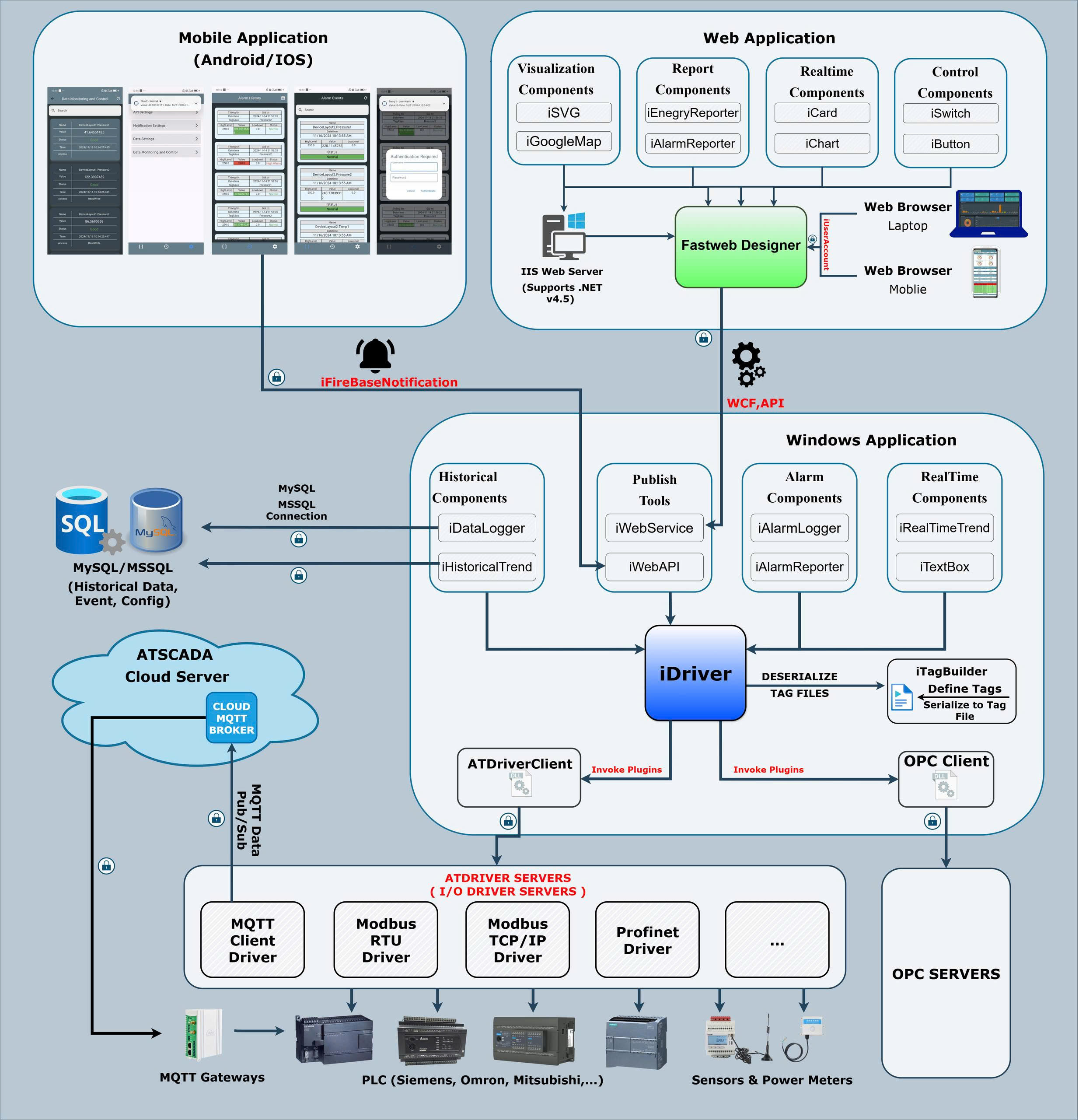
Key Components in ATSCADA Architecture
Based on the system diagram, ATSCADA architecture consists of four main blocks:
ATSCADA Applications Layer
This is the top layer where all SCADA functionalities operate.
It includes multiple modules:
- Historical Components
- iDataLogger
- iHistoricalTrend
- Graphic Components
- iGraphic
- iRealtimeTrend
- SCADA Advanced Programming
- VB.NET / C# scripting
- Alarm Components
- iAlarmLogger
- iSMS
- Authentication Components
- iLogin
- iUpdateUserAccount
- Realtime Components
- iTextBox
- iStatus
The alarm system in ATSCADA architecture is powered by modules such as iAlarmLogger and iSMS, which are part of the ATSCADA Alarm Tools used for real-time event notification and logging.
iDriver – Core of ATSCADA Architecture
This is the most important part of the system.
iDriver acts as:
- Data communication engine
- Protocol abstraction layer
- Central data dispatcher
What iDriver does:
- Collects data from driver servers
- Standardizes data format
- Distributes data to SCADA components
- Handles real-time and historical data requests
Driver & Plugin Layer (ATDriver + OPC)
Below iDriver is a flexible plugin-based system:
ATDriver Client
- Connects to ATDriver Servers (I/O Driver Servers)
- Supports industrial protocols:
- Modbus RTU
- Modbus TCP/IP
- PPI
- MPI
- PROFINET
OPC Client
- Connects to OPC Servers
- Enables integration with third-party systems
Industrial Communication Layer
This is where real devices exist.
Includes:
- PLC systems
- Industrial controllers
- Field devices
Connected through:
- ATDriver Servers
- OPC Servers
Communication runs over:
- Local network
- LAN
- Internet
Data Layer (Database & External Systems)
ATSCADA also integrates with external systems:
- MySQL Database
- Stores historical data
- Supports reporting (Excel, third-party apps)
- Tag System
- Tag Builder → Tag File (serialized data structure)
Data Flow in ATSCADA Architecture
The diagram shows a clear data pipeline:
- Field devices send data → ATDriver Servers / OPC Servers
- Data is transferred via ATDriver Client / OPC Client
- iDriver receives and processes data
- Data is distributed to SCADA components
- Data is stored in MySQL database
- External applications can access reports
Why iDriver Makes ATSCADA Architecture Different
Centralized Data Handling
All SCADA modules use a single data source → iDriver
Plugin-Based Expansion
New protocols can be added via plugins without changing core system
Protocol Abstraction
Applications don’t need to know Modbus, OPC, etc.
Scalable Design
Easily expand from small systems to enterprise-level deployments
Conclusion
ATSCADA Architecture is designed around a powerful central component—iDriver—which connects SCADA applications, driver systems, and industrial devices into a unified data ecosystem.
By combining:
- Modular application components
- Plugin-based drivers
- Centralized data processing
ATSCADA delivers a scalable, flexible, and modern SCADA architecture suitable for complex industrial environments.
ATSCADA - Providing ATSCADA software - The monitoring and data acquisition control system is the appropriate choice for integrated system projects, IoT, smart city projects, agriculture 4.0... Is trusted by many customers.
Related posts
SCADA Architecture: Complete Guide to Modern Industrial Systems with ATSCADA Software
Introduction In modern industrial environments, efficiency, reliability, and data-driven decision-making are no longer optional—they are [...]
Apr
SCADA Demo: Testing ATSCADA Before Deployment
A scada demo allows businesses to explore real-time monitoring, control systems, and industrial data management [...]
Apr
Free SCADA Software – Industrial Monitoring with ATSCADA
In the age of Industry 4.0, businesses are under increasing pressure to digitize operations while [...]
Apr
ATSCADA – The Best SCADA Software Download for Industrial Automation
If you are searching for a reliable SCADA software download, ATSCADA is a powerful solution [...]
Apr
ATSCADA – Next Generation SCADA Software Platform
In today’s industrial landscape, efficiency, scalability, and real-time data are critical for success. A modern [...]
Mar
SCADA System Development in ATSCADA: Research Foundations and Architecture Design
SCADA system development has evolved significantly in recent years, moving from monolithic architectures to modular, [...]
Mar