
SCADA Software
SCADA Architecture Diagram: Understanding ATSCADA System Architecture
A SCADA architecture diagram is essential for understanding how industrial systems collect, transmit, and process data in real time. It visually represents how components such as PLCs, servers, communication networks, and user interfaces interact within a SCADA system.
The ATSCADA system architecture provides a clear and structured model that reflects modern industrial requirements, including scalability, real-time monitoring, and integration with IoT platforms.
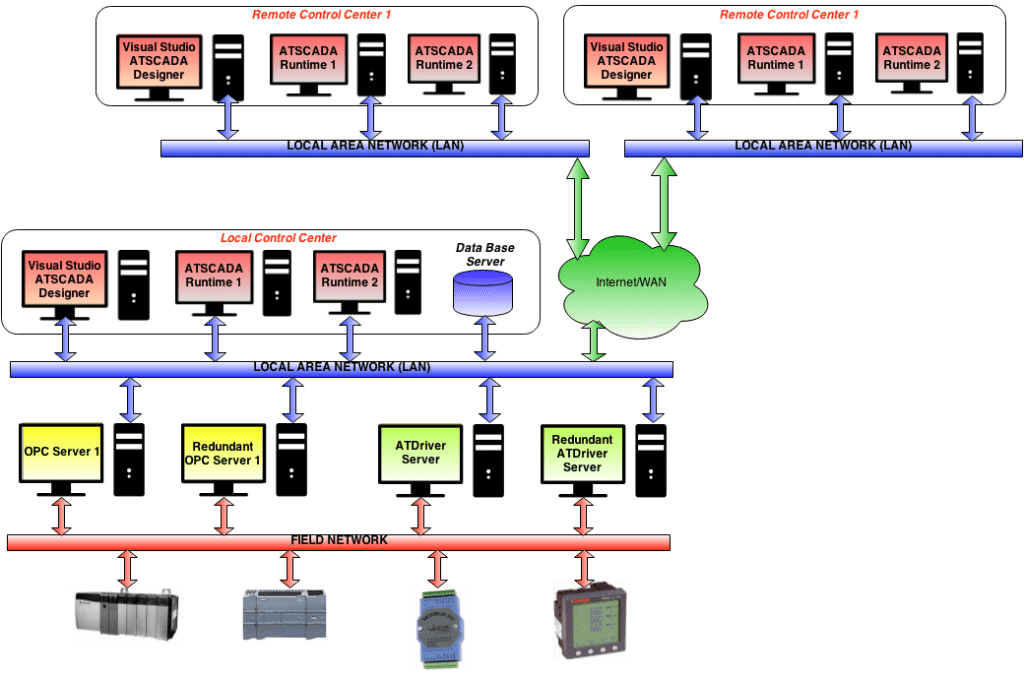
Overview of SCADA Architecture Diagram
ATSCADA System Architecture Explained
Based on the ATSCADA architecture diagram, the system is designed with a modular and distributed structure, allowing flexible deployment in industrial environments.
Field Layer (Sensors & Actuators)
This is the lowest level in the SCADA architecture diagram.
- Sensors collect real-time data (temperature, pressure, flow)
- Actuators execute control commands
These devices form the foundation of the entire system.
Control Layer (PLC / RTU)
At this level:
- PLCs and RTUs process data from field devices
- Execute control logic
- Send data to the upper SCADA layer
PLCs act as the bridge between physical equipment and digital systems.
Communication Layer
The communication network connects all system components.
Common technologies include:
- Ethernet
- Modbus
- OPC UA
- MQTT
This layer ensures reliable and real-time data transmission between devices and servers.
SCADA Server & Application Layer
This is the core of the SCADA architecture diagram.
- Data processing
- Alarm management
- Historical data storage
- System logic execution
The SCADA server collects and organizes data for visualization and analysis.
HMI & User Interface Layer
The top layer allows operators to interact with the system.
- Real-time dashboards
- Alarm notifications
- Control commands
Operators use HMI to monitor and control industrial processes efficiently.
Cloud & Web SCADA Layer (ATSCADA Advantage)
Unlike traditional systems, ATSCADA integrates:
- Web-based SCADA
- Cloud connectivity
- Remote monitoring
This enables users to access the system from anywhere via browser, making it suitable for Industry 4.0 applications.
How to Read a SCADA Architecture Diagram
Understanding a SCADA architecture diagram becomes easier when you follow the data flow:
- Sensors collect data from the field
- PLC/RTU processes the data
- Data is transmitted via communication network
- SCADA server analyzes and stores data
- HMI displays information to operators
This flow ensures continuous monitoring and control in real time.
Key Benefits of ATSCADA Architecture
Modular Design
Flexible integration with plugins and components
Distributed System
Supports large-scale industrial deployment
Real-Time Monitoring
Instant data acquisition and visualization
Cloud Integration
Remote access and scalability
Real-World Applications
SCADA architecture diagrams are used in:
- Manufacturing systems
- Power plants
- Water treatment facilities
- Smart cities
- Agriculture 4.0
These industries rely on SCADA to ensure efficiency, automation, and real-time control.
Conclusion
A well-designed SCADA architecture diagram is critical for building efficient industrial systems. It helps engineers understand how data flows across different layers and ensures proper system integration.
ATSCADA architecture stands out by combining:
- Modular design
- Web-based SCADA
- Cloud integration
- Real-time monitoring
For modern industrial environments, this architecture provides a scalable and future-ready solution.
ATSCADA - Providing ATSCADA software - The monitoring and data acquisition control system is the appropriate choice for integrated system projects, IoT, smart city projects, agriculture 4.0... Is trusted by many customers.
Related posts
SCADA Architecture: Complete Guide to Modern Industrial Systems with ATSCADA Software
Introduction In modern industrial environments, efficiency, reliability, and data-driven decision-making are no longer optional—they are [...]
Apr
SCADA Demo: Testing ATSCADA Before Deployment
A scada demo allows businesses to explore real-time monitoring, control systems, and industrial data management [...]
Apr
Free SCADA Software – Industrial Monitoring with ATSCADA
In the age of Industry 4.0, businesses are under increasing pressure to digitize operations while [...]
Apr
ATSCADA – The Best SCADA Software Download for Industrial Automation
If you are searching for a reliable SCADA software download, ATSCADA is a powerful solution [...]
Apr
ATSCADA – Next Generation SCADA Software Platform
In today’s industrial landscape, efficiency, scalability, and real-time data are critical for success. A modern [...]
Mar
SCADA System Development in ATSCADA: Research Foundations and Architecture Design
SCADA system development has evolved significantly in recent years, moving from monolithic architectures to modular, [...]
Mar