
SCADA Software
SCADA Driver Development | Native Driver Programming in ATDriver
SCADA driver development is a critical part of industrial automation, allowing SCADA systems to communicate directly with PLCs, sensors, and other field devices within a modern cloud SCADA architecture. In the ATSCADA ecosystem, ATDriver Server provides a powerful foundation for building custom and native drivers with high performance and flexibility.
This article focuses on how to develop a native SCADA driver in ATDriver, including architecture, programming requirements, and practical implementation based on available source code.
Understanding Plug & Play SCADA Driver in ATDriver
ATDriver Server is designed with a Plug & Play driver architecture, allowing developers to easily integrate and extend communication drivers.
Key features:
- Flexible driver integration without restarting the system
- Modular driver design using DLL components
- Easy expansion with custom native drivers
- Compatible with multiple industrial protocols
With this architecture, developers can quickly build and deploy new drivers tailored to specific devices or communication standards.
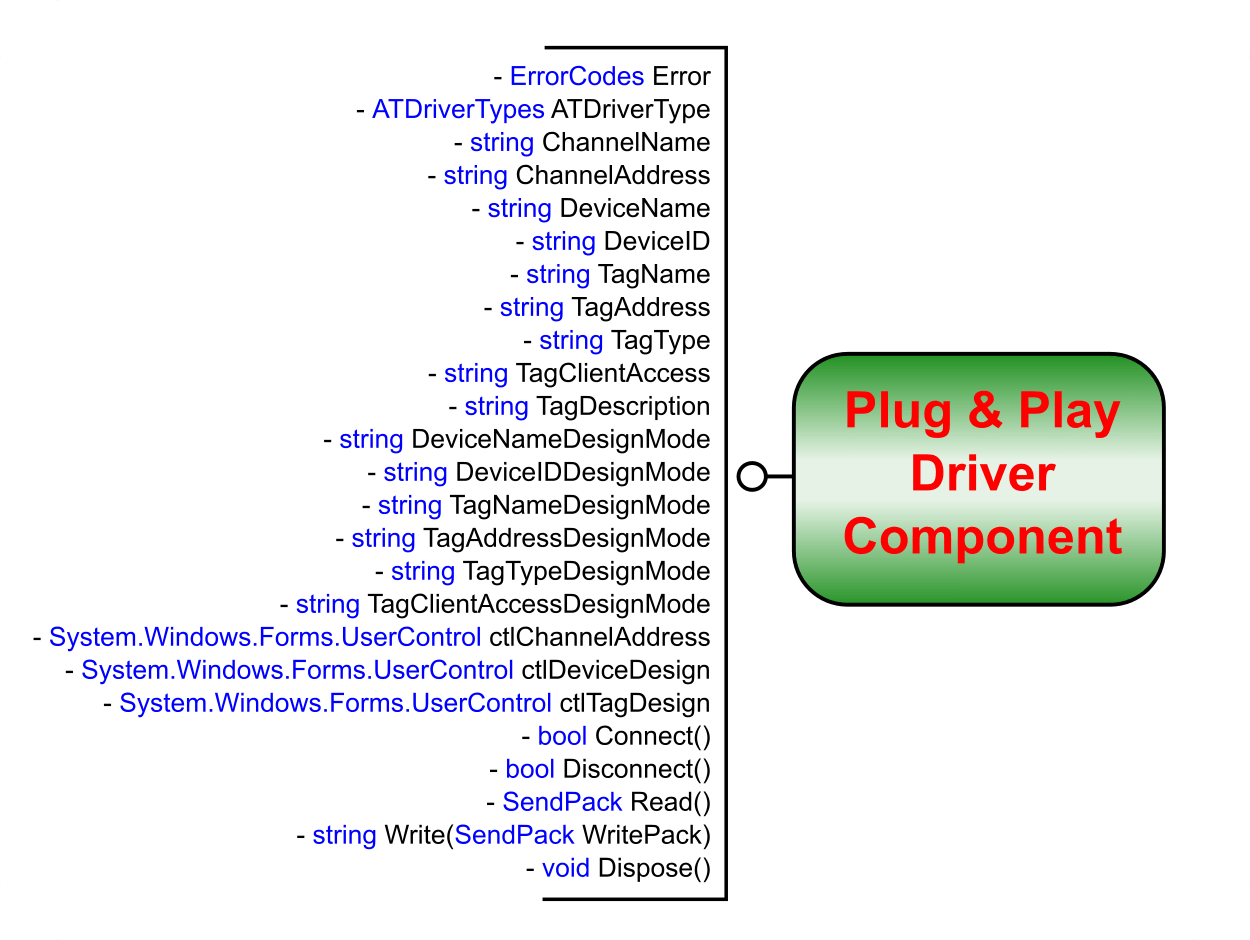
Figure 1: The necessary interfaces for a driver to be plug-and-play in ATDriver Server.
Available Source Code for SCADA Driver Development
ATDriver provides sample source code to help developers get started and reduce development time.
Included examples:
- Modbus RTU Driver Source Code
- Modbus TCP/IP Driver Source Code
These examples demonstrate:
- Communication handling
- Data reading/writing methods
- Protocol structure implementation
Programming Requirements for Native SCADA Driver
To successfully develop a SCADA driver in ATDriver, you need the following technical skills:
Programming Languages
- C# (.NET)
- VB.NET
Development Environment
- Microsoft Visual Studio
Technical Knowledge
- Creating Component (DLL) in Visual Studio
- Understanding class libraries and driver structure
- Building and compiling projects into DLL files
These DLL files will be loaded into ATDriver Server as Plug & Play drivers.
SCADA Driver Development Workflow in ATDriver
Analyze Communication Protocol
- Identify device protocol (Modbus, TCP/IP, Serial, etc.)
- Understand register mapping and data structure
Develop Driver Component (DLL)
- Create a Class Library project in Visual Studio
- Implement communication logic (Read/Write functions)
Build and Export DLL
- Compile the project into a DLL file
- Ensure compatibility with ATDriver Server
Integrate into ATDriver Server
- Load DLL into the driver system
- Configure communication parameters
Test and Optimize
- Validate real-time communication
- Debug errors and optimize performance
Advantages of Native SCADA Driver Development
Developing a native SCADA driver in ATDriver offers significant benefits:
High Performance
Direct communication without OPC layers reduces latency.
Full Customization
Supports proprietary protocols and special device requirements.
Easy Integration
Seamlessly works with ATSCADA Tag system and real-time data engine.
Scalability
Supports large-scale industrial systems and distributed architectures.
Best Practices for SCADA Driver Development
To ensure reliability and efficiency:
- Use structured and modular code
- Implement error handling and reconnection logic
- Optimize polling cycle timing
- Test with both simulation and real devices
- Reuse logic from Modbus sample drivers when possible
Real-World Applications
SCADA drivers developed with ATDriver are widely used in:
- Industrial automation systems
- Energy monitoring systems
- Smart factories (Industry 4.0)
- Water treatment and infrastructure
- IoT-based monitoring platforms and modern SCADA cloud system deployments
Conclusion
SCADA driver development in ATDriver provides a powerful and flexible way to build communication layers for industrial systems. With Plug & Play architecture, sample Modbus source code, and support for .NET development, engineers can quickly create high-performance native drivers tailored to any application.

ATSCADA - Smart SCADA Software with AI Predictor & Blockchain. ATSCADA is an advanced SCADA software platform for real-time monitoring, intelligent control, and efficient data acquisition. It is ideal for Industrial IoT (IIoT), smart cities, integrated automation systems, and Agriculture 4.0. With a built-in AI Predictor, ATSCADA enables predictive analytics to detect issues early, optimize performance, and reduce downtime. The integration of Blockchain technology ensures secure, transparent, and tamper-proof data management. Highly scalable and easy to integrate, ATSCADA is trusted by businesses to enhance productivity, strengthen cybersecurity, and accelerate digital transformation.
Bài viết liên quan
Contact Us
Looking for support, consultation, or more information about the ATSCADA Platform? ATSCADA Lab is ready [...]
Apr
What’s New in ATSCADA Software V5.0.0.1?
1. ATDriver Server V5.0.0.1 Within ATSCADA Software, the data acquisition module has been significantly enhanced [...]
Apr
SCADA Architecture: Complete Guide to Modern Industrial Systems with ATSCADA Software
Introduction In modern industrial environments, efficiency, reliability, and data-driven decision-making are no longer optional—they are [...]
Apr
SCADA Demo: Testing ATSCADA Before Deployment
A scada demo allows businesses to explore real-time monitoring, control systems, and industrial data management [...]
Apr
Free SCADA Software – Industrial Monitoring with ATSCADA
In the age of Industry 4.0, businesses are under increasing pressure to digitize operations while [...]
Apr
ATSCADA – The Best SCADA Software Download for Industrial Automation
If you are searching for a reliable SCADA software download, ATSCADA is a powerful solution [...]
Apr