
Technical Guides
SCADA Database Backup and Restore for ATSCADA Projects
Managing data is a critical part of any industrial automation system. A reliable SCADA database ensures that all operational data is stored, protected, and recoverable. This guide explains how to perform backup and restore processes for ATSCADA projects, helping maintain system stability and data integrity.
What is a SCADA Database?
A SCADA database is where all system data is stored, including:
- Real-time process data
- Historical logs
- Alarm events
- Reports and analytics
In ATSCADA, MySQL is commonly used to manage and store this data efficiently, supporting industrial monitoring and control systems.
SCADA Project Deployment and Database Role
In ATSCADA architecture, a SCADA database plays an important role when deploying projects to client machines:
- Stores project data centrally
- Allows data synchronization between systems
- Supports backup and recovery operations
The system includes processes such as project creation, deployment to client machines, and database backup/restore to ensure continuity.
PROCESS FOR CREATING AND EXECUTING ATSCADA PROJECTS ON CLIENT MACHINES
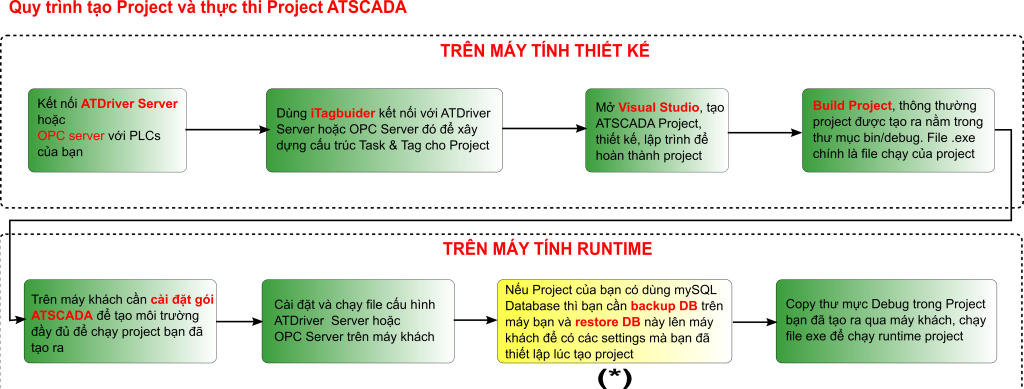
Backup and restore MySQL database for ATSCADA project.
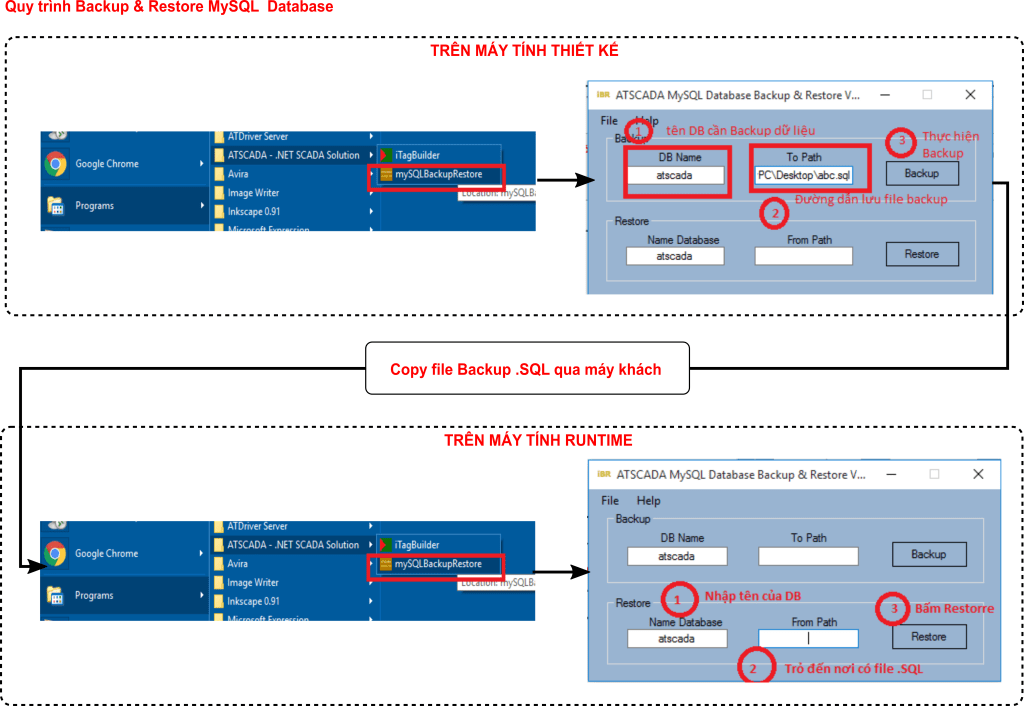
Backup SCADA Database in ATSCADA
Backing up a SCADA database is essential to prevent data loss caused by system failures, hardware issues, or unexpected errors.
Key Benefits of Backup:
- Protects critical industrial data
- Enables fast recovery in case of failure
- Supports system migration to other machines
Backup Process Overview:
- Access the ATSCADA database tools
- Select the database to backup
- Export data into backup files (e.g., SQL format)
- Store backup securely
Regular backups are recommended to ensure system reliability.
Restore SCADA Database in ATSCADA
Restoring allows you to recover system data and resume operations quickly.
Restore Process:
- Select the backup file
- Import database into MySQL
- Reconnect ATSCADA system to the restored database
This process ensures that the system can continue operating without data loss.
Workflow: ATSCADA Project with Database
The complete workflow in ATSCADA includes:
- Create SCADA project
- Deploy project to client machine
- Backup SCADA database
- Restore database when needed
This structured process ensures that remains consistent and reliable throughout the project lifecycle.
Best Practices for SCADA Database Management
To optimize your SCADA database, follow these best practices:
- Perform regular backups
- Store backup files in secure locations
- Monitor database performance
- Use reliable database systems like MySQL
Without proper backup, system failures can lead to complete data loss, making recovery difficult or impossible.
Applications of SCADA Database
Widely used in:
- Industrial automation systems
- Smart factory monitoring
- Energy management systems
- Water and wastewater treatment
SCADA systems like ATSCADA collect, store, and analyze real-time data, helping businesses improve efficiency and decision-making.
Conclusion
A well-managed SCADA database is essential for ensuring data integrity and system reliability in industrial automation. With ATSCADA, backup and restore processes are straightforward, allowing engineers to protect and recover critical data easily
By implementing proper database management strategies, businesses can maintain stable operations and maximize the performance of their 🚀
ATSCADA - Providing ATSCADA software - The monitoring and data acquisition control system is the appropriate choice for integrated system projects, IoT, smart city projects, agriculture 4.0... Is trusted by many customers.
Related posts
UART Communication Explained: Working Principle and Applications
Electronic applications widely use UART communication to transfer data between devices such as computers, microcontrollers, [...]
Mar
Domain, Hosting, VPS, Cloud Server & SSL for SCADA Systems (ATSCADA Platform)
In the era of Industry 4.0, deploying SCADA systems on Web and Cloud platforms is [...]
Oct
SSL Certificate for SCADA Web – Secure Your ATSCADA System
Protect Your SCADA Web Data with SSL Encryption Ensure that all data exchanged between your [...]
Oct
Register Domain for ATSCADA Web – Secure & Professional Branding
Domain Registration with Viettel IDC A domain name is the unique address of a website [...]
Oct
Viettel Colocation Services for Cloud SCADA Systems – Secure, Scalable & High-Performance Infrastructure
For large-scale Cloud SCADA and IIoT systems, choosing the right infrastructure is critical to ensure [...]
Oct
Viettel Cloud VPS Server – Secure & Scalable Hosting for Cloud SCADA and IIoT Systems
The Viettel Cloud VPS (Virtual Private Server) service from Viettel IDC is widely trusted for [...]
Oct