
SCADA Software
ATSCADA IFTP – Advanced FTP File Transfer Tools for Industrial SCADA Systems
ATSCADA IFTP is a specialized FTP communication toolkit designed for industrial automation and environmental monitoring systems. It enables automatic file transfer through the FTP protocol, making it ideal for sending reports, measurement logs, and compliance data to government agencies such as the Department of Natural Resources and Environment.
With ATSCADA IFTP, users can integrate FTP functions directly into SCADA applications developed in Visual Studio, ensuring reliable and secure data transmission.
What Is ATSCADA IFTP?
ATSCADA IFTP (iFTPTools) is a software toolkit that supports file transfer using the FTP protocol. It is commonly used in:
- Environmental monitoring stations
- Wastewater treatment systems
- Air quality monitoring systems
- Industrial reporting systems
- Remote SCADA data collection networks
This toolkit helps automate report uploads, daily log transfers, and remote file synchronization, while supplying historical datasets for AI time series forecasting.
System Preparation and Installation
Step 1: Install the iFTPTools Package
To begin , follow these installation steps:
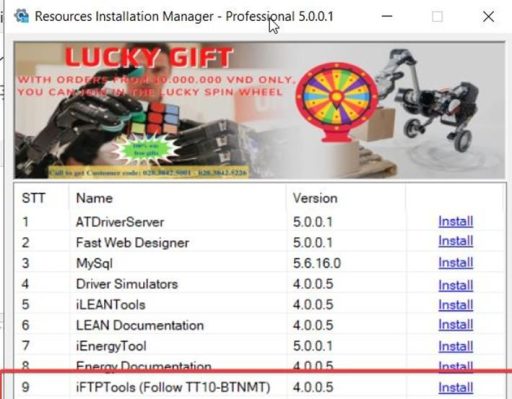
- Open Resources Installation Manager.
- Find iFTPTools (Version 4.0.0.5) in the package list.
- Click Install.
- When the Setup window appears, click Install → Finish to complete installation.
After installation, the ATSCADA IFTP components will be ready for Visual Studio integration.
Visual Studio Interface Setup
Step 2: Add ATSCADA IFTP to Toolbox
- Open Visual Studio.
- Create a Windows Forms App (.NET Framework) project.
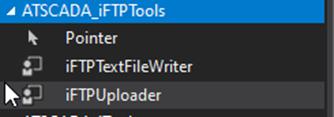
- In the Toolbox, right-click and choose Add Tab.
- Name the new tab:
ATSCADA iFTPTools
- Right-click the new tab and select Choose Items…
- Click Browse and navigate to:
C:\Program Files\ATPro\ATSCADA\iFTPTools\iFTPTools.dll.
- Click OK.
The ATSCADA IFTP tool icons will now appear inside the Toolbox.
Detailed Guide to ATSCADA IFTP Tools
Important Note
Before using any other tools, always drag the iDriver component onto the form first.
The driver is required for communication between components.
iDataConverter Tool – Data Conversion
The iDataConverter tool is used to convert numeric machine states into readable text values.
Example:
0= OFF1= ON
This improves operator visibility and dashboard readability.
How to Use iDataConverter
Step 1: Add Component
Drag iDataConverter onto the Windows Form.
Step 2: Configure Properties
Set the following values:
- Driver: Select iDriver
Collection Settings
Click the … button to open the configuration table.
Set:
- Trigger Tag: Starstop
Mapping Values
- Value 0 → Target Tag: State → Display: OFF
- Value 1 → Target Tag: State → Display: ON
After configuration, ATSCADA IFTP automatically converts numeric values into readable machine states.

Benefits of ATSCADA IFTP
- Automatic FTP file uploads
- Easy integration with Visual Studio
- Better status visualization with support for mobile alarm applications for remote notifications.
- Stable and reliable file transfer
- Reduced manual reporting tasks
- Suitable for environmental compliance systems
Applications
ATSCADA IFTP is widely used in:
- Wastewater monitoring stations
- Air emission reporting systems
- Smart factory data transfer
- Industrial SCADA centers
- Utility management systems
Why Choose ATSCADA IFTP?
Compared with manual file transfer methods, offers better automation, higher reliability, and faster report delivery.
For companies that must submit scheduled reports to authorities, ATSCADA IFTP is an efficient and professional solution.
Conclusion
ATSCADA IFTP is a powerful FTP toolkit for industrial systems that need automatic file transfer. From installation to Visual Studio integration and data conversion tools, it provides everything needed for modern SCADA communication.
If your project requires secure FTP reporting and automated file exchange, ATSCADA IFTP is an excellent choice.
👉 Learn More about ATSCADA Architecture

ATSCADA - Smart SCADA Software with AI Predictor & Blockchain. ATSCADA is an advanced SCADA software platform for real-time monitoring, intelligent control, and efficient data acquisition. It is ideal for Industrial IoT (IIoT), smart cities, integrated automation systems, and Agriculture 4.0. With a built-in AI Predictor, ATSCADA enables predictive analytics to detect issues early, optimize performance, and reduce downtime. The integration of Blockchain technology ensures secure, transparent, and tamper-proof data management. Highly scalable and easy to integrate, ATSCADA is trusted by businesses to enhance productivity, strengthen cybersecurity, and accelerate digital transformation.
Bài viết liên quan
ATSCADA AI Predictor Application for Time Series Data Forecasting
Introduction ATSCADA AI Predictor is an artificial intelligence application used for forecasting time series data [...]
Apr
ATSCADA Mobile Alarm Application for SCADA Alerts
The ATSCADA Mobile Alarm Application is a smart mobile solution developed by ATSCADA Lab, designed [...]
Apr
ATSCADA Fastweb -Industrial Web SCADA Applications
iWebService Tool The iWebService tool is a software component developed by ATSCADA Lab, operating in [...]
Apr
ATSCADA IExcelPouringTools – Smart Excel Pouring Data Management for Industrial Automation
ATSCADA IExcelPouringTools is a powerful toolkit designed to generate Excel reports from pre-built templates without [...]
Apr
ATSCADA IWebAPI Tools – Web API Integration Tools for Modern SCADA Systems
The ATSCADA IWebAPI toolset is designed to retrieve data from ATDriver Server and expose it [...]
Apr
ATSCADA iEnergy– Smart Energy Monitoring and Management System
ATSCADA iEnergy Tools is an extension library (plugin) for the ATSCADA SCADA system, working alongside [...]
Apr