
SCADA Software
ATSCADA Mobile Alarm Application for SCADA Alerts
The ATSCADA Mobile Alarm Application is a smart mobile solution developed by ATSCADA Lab, designed to operate on both Android and iOS devices. This application allows users to receive real-time notifications and alarm warnings directly on their smartphones or tablets whenever important technical parameters exceed configured limits.
With the ATSCADA Mobile Alarm Application, users can monitor industrial systems anytime and anywhere without staying in the control room. The application instantly reports critical values such as:
- Temperature
- Humidity
- Pressure
- Water level
- Flow rate
- Equipment status
- Power alerts
- Communication failures
This mobile alarm solution helps businesses improve safety, reduce downtime, and increase response speed during emergencies.
The ATSCADA Mobile Alarm Application is ideal for factories, manufacturing plants, water treatment systems, smart buildings, agriculture systems, power plants, and industrial automation projects.
Installation and Initial Configuration
The setup process of the ATSCADA Mobile Alarm Application is simple and user-friendly. After installation, users only need to configure the server connection and notification settings.
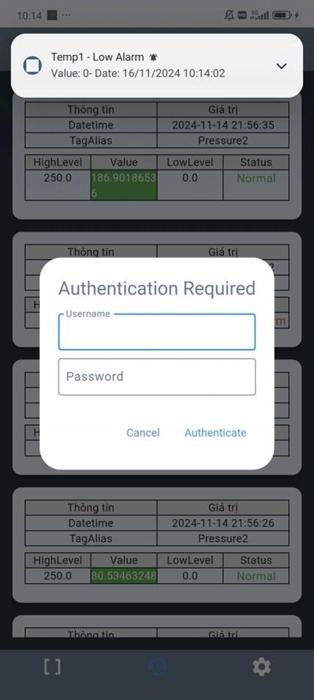
Step 1: Launch the Application and Grant Permissions
- Open the Alarm App after installation.
- When the system requests notification permission, tap Allow.
- This ensures you receive sound alerts, popup notifications, and visual warning messages in real time.
Allowing notifications is an important step to guarantee that no critical alarm is missed.
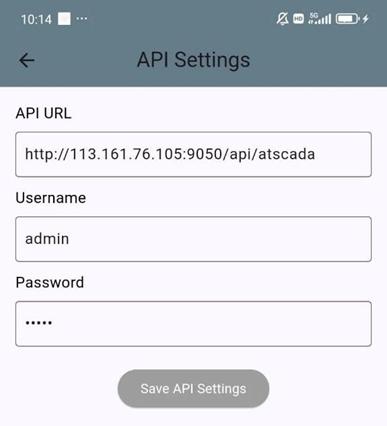
Step 2: Enter Connection Parameters
At the configuration screen, enter the following information:
- API URL: Server address used for communication.
Example:http://192.168.1.21:9099/api/atscada - Username: Login account.
Example:admin - Password: Secure login password.
These credentials allow the ATSCADA Mobile Alarm Application to connect securely with the monitoring server and ATSCADA Fastweb industrial web SCADA applications for browser-based supervision.
• Topic: Subject of the message (Example: atscada)
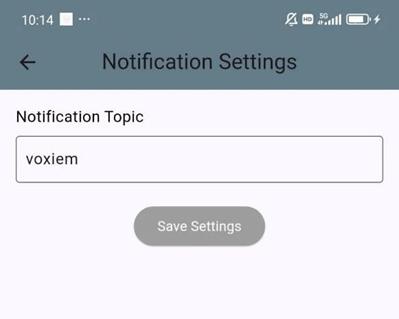
• Press Save to save. The system will prompt you to restart the application to apply the changes; press OK and reopen the app.
Main Features on the Interface
The ATSCADA Mobile Alarm Application provides a clean and efficient interface for alarm monitoring and historical data review.
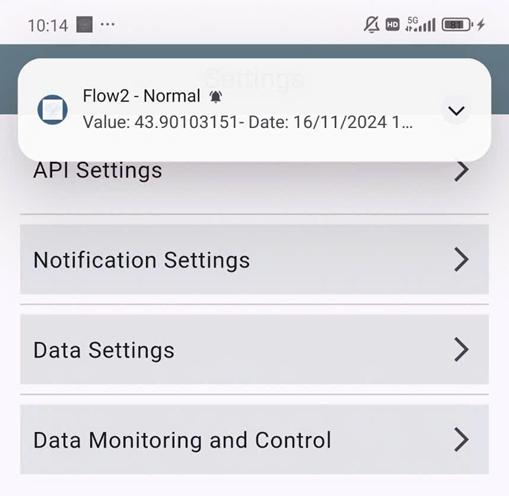
Alarm Events (Real-Time Alarm Events)
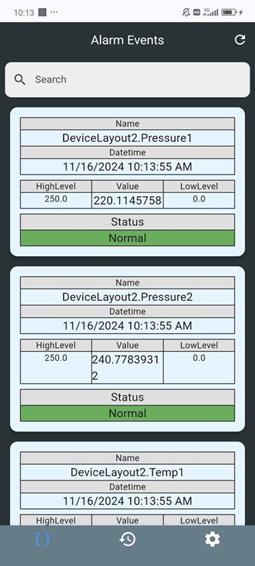
This is the main dashboard showing the current condition of all monitored devices and process points.
Displayed Information
Each alarm card may include:
- Location – Device or area name
- Update Time – Latest timestamp
- High Level – Maximum warning threshold
- Low Level – Minimum warning threshold
- Value – Current measured value
This allows operators to quickly understand system status.
Alarm Status Types
Normal
- System operating normally
- Displayed in green color
High Alarm
- Value exceeds high threshold
- Displayed in red color
- Requires immediate attention
Examples:
- High temperature
- Overpressure
- Tank overflow risk
Low Alarm
- Value below low threshold
- Displayed in yellow color
Examples:
- Low water level
- Low humidity
- Low pressure
Connection Lost
- No communication signal from server
- Indicates network or device issue
The ATSCADA Mobile Alarm Application helps users detect abnormal conditions immediately.
Alarm History (Alarm Historical Records)
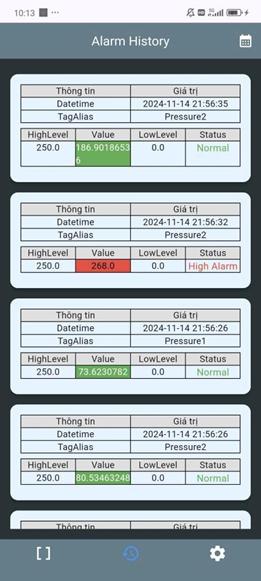
The Alarm History section allows users to review all previous alarm activities for troubleshooting and reporting purposes, with export options through ATSCADA iExcelPouring smart Excel report automation.
Historical Information Includes
- Alarm occurrence time
- Alarm recovery time
- Equipment name
- Tag value
- Alarm level
- Current status
This feature is useful for maintenance teams and supervisors.
Filter and Search Tools
Users can search alarm records by:
Time Range
- Start Time
- End Time
Tag Name
Examples:
- Temp
- DoAm
- Pressure
- TankLevel
This helps users quickly locate specific incidents.
Benefits of ATSCADA Mobile Alarm Application
Using the ATSCADA Mobile Alarm Application provides many operational advantages.
Faster Response Time
Instant alerts allow users to solve issues before they become serious failures.
Reduced Downtime
Early detection prevents equipment shutdown and production interruptions.
Improved Safety
Critical alarms such as overheating or overflow can be handled immediately.
Remote Monitoring
Users can monitor systems:
- At home
- While traveling
- In another factory zone
- Outside office hours
Better Maintenance Planning
Alarm history helps identify recurring problems and supports preventive maintenance.

Application Industries
The ATSCADA Mobile Alarm Application can be deployed in many sectors:
Manufacturing
- Production machine alarms
- Motor failures
- Temperature control
Water & Wastewater
- Pump alarms
- Tank levels
- Flow monitoring
Energy
- Power loss alerts
- Generator alarms
- Load warnings
Smart Buildings
- HVAC alarms
- Fire warning systems
- Security alerts
Agriculture
- Greenhouse temperature
- Irrigation alarms
- Humidity monitoring
Why Choose ATSCADA Mobile Alarm Application?
Compared with traditional alarm systems, the ATSCADA Mobile Alarm Application offers:
- Real-time push notifications
- Mobile accessibility
- Easy installation
- Android & iOS support
- Secure server connection
- Historical alarm tracking
- Professional industrial use
It is the ideal solution for modern Industry 4.0 operations.
Conclusion
The ATSCADA Mobile Alarm Application is a reliable and modern mobile alarm solution for industrial systems. With real-time notifications, alarm history, and easy remote monitoring, it helps businesses improve efficiency, reduce risks, and maintain continuous operations.
For companies seeking a professional mobile SCADA alarm platform, the ATSCADA Mobile Alarm Application is the smart choice.
👉 Learn More about SCADA Software

ATSCADA - Smart SCADA Software with AI Predictor & Blockchain. ATSCADA is an advanced SCADA software platform for real-time monitoring, intelligent control, and efficient data acquisition. It is ideal for Industrial IoT (IIoT), smart cities, integrated automation systems, and Agriculture 4.0. With a built-in AI Predictor, ATSCADA enables predictive analytics to detect issues early, optimize performance, and reduce downtime. The integration of Blockchain technology ensures secure, transparent, and tamper-proof data management. Highly scalable and easy to integrate, ATSCADA is trusted by businesses to enhance productivity, strengthen cybersecurity, and accelerate digital transformation.
Bài viết liên quan
ATSCADA AI Predictor Application for Time Series Data Forecasting
Introduction ATSCADA AI Predictor is an artificial intelligence application used for forecasting time series data [...]
Apr
ATSCADA Fastweb -Industrial Web SCADA Applications
iWebService Tool The iWebService tool is a software component developed by ATSCADA Lab, operating in [...]
Apr
ATSCADA IExcelPouringTools – Smart Excel Pouring Data Management for Industrial Automation
ATSCADA IExcelPouringTools is a powerful toolkit designed to generate Excel reports from pre-built templates without [...]
Apr
ATSCADA IWebAPI Tools – Web API Integration Tools for Modern SCADA Systems
The ATSCADA IWebAPI toolset is designed to retrieve data from ATDriver Server and expose it [...]
Apr
ATSCADA IFTP – Advanced FTP File Transfer Tools for Industrial SCADA Systems
ATSCADA IFTP is a specialized FTP communication toolkit designed for industrial automation and environmental monitoring [...]
Apr
ATSCADA iEnergy– Smart Energy Monitoring and Management System
ATSCADA iEnergy Tools is an extension library (plugin) for the ATSCADA SCADA system, working alongside [...]
Apr