
SCADA Basics
SCADA System Software Architecture Overview
The SCADA System Software architecture is a combination of two main parts: execution software (runtime software) and configuration software. A basic structure typically starts with a PLC setup or a Remote Terminal Unit (RTU).
PLCs and RTUs communicate with a wide range of industrial devices in the factory, such as sensors, switching equipment, control valves, and other field components. After that, operational data is transmitted from the field equipment to a computer through the SCADA System Software.
Then processes, distributes, and displays the collected data. This enables operators and engineers to analyze system performance efficiently and make critical decisions quickly.
ATSCADA – Vietnamese SCADA System Software is a modern platform for industrial automation. For more foundational guides, visit our SCADA Basics category.
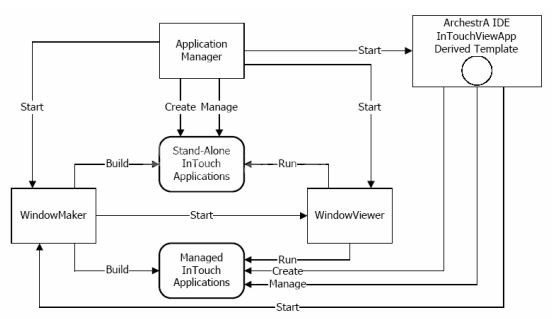
The Application Manager is used to create and manage applications in InTouch.
WindowMaker is the application development environment that includes graphic files and development tools for building SCADA applications. This development tool provides scripting language features and tag management functions, allowing users to define the properties of objects within the window-based application.
WindowViewer is used to run applications created in WindowMaker. It executes the functions and object behaviors defined in the WindowMaker project. By using data collected from tags, WindowViewer supports key features such as Alarm Logging, Report Generating, and Trending.
To better understand the SCADA system definition, it is important to explore how SCADA works with PLCs and RTUs in real industrial applications.
SCADA System Software Architecture of GeniDAQ
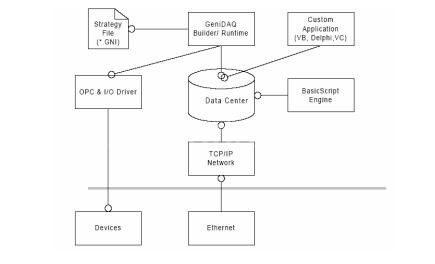
GeniDAQ features a modular and open architecture, allowing users to easily integrate other applications for data sharing. This structure significantly improves GeniDAQ’s I/O capacity and processing scalability. The following diagram describes the GeniDAQ System Architecture:
GeniDAQ Builder
GeniDAQ Builder is the application development tool that allows users to create HMI applications. The development environment includes configuration for Tasks, Scripts, and Displays.
GeniDAQ Runtime
GeniDAQ Runtime provides the real-time execution environment for GeniDAQ applications. No modifications can be made during runtime.
Operational data is continuously collected and visualized in real time, as shown in SCADA Demo, helping operators make critical decisions efficiently.
Basic Script Engine
The Basic Script Engine is a DLL library that helps compile source code during build-time and execute scripts during run-time. It uses VB for Applications (VBA), allowing users to perform calculations, read and write files, and connect through DDE and ODBC. It can also communicate with applications such as Microsoft Access and Microsoft Excel.
OPC Client
The OPC Client connects to standard OPC device servers through an OPC Server. OPC standards allow GeniDAQ to easily integrate with industrial automation systems.
I/O Driver
The I/O Driver collects real-time data directly from hardware devices. GeniDAQ I/O Drivers support a wide range of industrial hardware such as Advantech devices, DA&C cards, MIC-200 controllers, remote I/O modules, ADAM-4000 series, and distributed ADAM-5000 modules.
SCADA System Software Architecture of WinCC
WinCC is a SCADA software platform developed by Siemens (Germany) and is widely used in Vietnam. The WinCC architecture includes both a configuration subsystem and an execution subsystem.
The WinCC includes:
- Configuration Software: used to create and design the project.
- Runtime Software: used to run and execute the project while processing data in real time.

SCADA System Software Operation Process
-
To use SCADA System Software, the first step is to create a project. The project information is compiled and stored in memory. When the runtime process begins, the system reads this information from the configuration database and stores it in the runtime (RT) database.
When the screen displays the graphical interface, the SCADA System Software continuously receives input from operators, such as starting commands or value adjustments. Communication channels establish the connection between the SCADA system and the automation system. These channels are responsible for collecting and transmitting information to SCADA System Software components.
Next, the system reads and writes tag values into the automation system. In addition to communication channels, OLE, OPC, or ODBC can perform data exchange. The system then uses these stored values to generate trending charts and reports.
ATSCADA – Vietnamese SCADA System Software
A team of experienced automation and IT engineers at ATSCADA Lab designed and developed the ATSCADA System Software. This platform supports industrial automation and digital transformation across multiple industries.
ATSCADA has been widely applied in projects across Vietnam, including monitoring and controlling electrical systems, water systems, and industrial production environments. It is a modern platform that provides advanced features while remaining user-friendly and flexible.
ATSCADA - Providing ATSCADA software - The monitoring and data acquisition control system is the appropriate choice for integrated system projects, IoT, smart city projects, agriculture 4.0... Is trusted by many customers.
Related posts
SCADA and IoT : Modern Industry 4.0
Industry 4.0 is creating a major transformation in the way businesses operate and manufacture. The [...]
Apr
ALL ABOUT SCADA SYSTEM
The SCADA system is the combination of hardware devices and software that allows monitoring and [...]
Oct
SCADA – IoT: Công Nghệ Bổ Sung Cho Công Nghiệp 4.0 Hiện Đại
Công nghiệp 4.0 đang tạo ra sự thay đổi lớn trong cách các doanh nghiệp [...]
Sep
Xu hướng ứng dụng hệ thống scada trong công nghiệp
Các hoạt động sản xuất công nghiệp ngày nay càng cao đòi hỏi nhiều tiêu [...]
Dec
Everything You Need to Know About SCADA Systems
A SCADA Systems is a combination of hardware devices and software that enables remote monitoring [...]
Dec
SCADA Security on Cloud – Securing ATSCADA Cloud Systems
Phan Duy Anh, Master’s Degree in Automation and Control, CEO of ATSCADA Lab Cloud SCADA, [...]
Nov