
Technical Guides
Using Symbol Factory in SCADA Software for SCADA Symbols Design
Using Symbol Factory in SCADA software is an excellent solution if you want to design HMI or SCADA systems professionally. Let’s explore the details in the article below and discover how to optimize your design with SCADA symbols.
What is Symbol Factory?
Symbol Factory is a graphics library with nearly 4,000 high-quality scalable vector graphics (SVG) for projects. The library is commonly used for control elements such as pipelines, mixers, switches, lights, and buttons—making it highly effective for designing SCADA symbols.
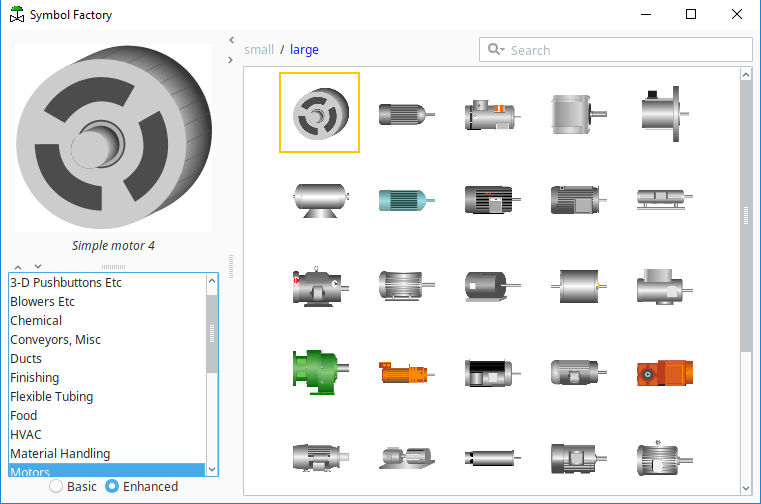
It is suitable for application design on mobile devices or any deployment platform, allowing users to view HMI and SCADA on screens of various sizes while maintaining consistent SCADA symbols.
- Integrate objects into applications in various formats, including metafile, bitmap (.bmp), SVG, VML, or PNG.
- Works with multiple file types such as WMF, EMF, BMP, PNG, SVG, and VML.
- The Librarian application provides easy-to-use features for resizing, adjusting color palettes, and changing object orientation. It also allows users to create custom categories and import their own graphics into the library. Graphics can be imported from vector WMF (Windows Metafile) or BMP formats—making it highly versatile for managing SCADA symbols.
Symbol Factory Tools help you easily create SCADA projects without the need for coding, simplifying the use of SCADA symbols.
- Software compatibility list: The software has been tested to work with Symbol Factory 2.0, including ABB (Advant Graphics Builder), Microsoft Office, National Instruments (BridgeVIEW, LabVIEW, Lookout), Nematron (Paragon), Rockwell Software (RSTools, RSView, RSWorkbench, WinVIEW), Siemens WinCC, WinCC Flexible, Visual Basic, and more—supporting a wide range of SCADA symbols applications.
- Categories: Motors, sensors, tanks, valves, pumps, HVAC, steam, and more.
- Drag-and-drop support: Symbol Factory allows users to drag icons from the software and drop them into other applications or vice versa, similar to copy and paste.
- Image optimization: The size and complexity of metafile data can be reduced using the new image optimization feature, improving performance when working with SCADA symbols.
iSymbolFactory integrates Symbol Factory tools into the ATSCADA application, enabling efficient use of SCADA symbols.
Currently, we can flexibly integrate factory symbols into Visual Studio. This video, created by ATSCADA Lab, provides guidance on adding Symbol Factory into Visual Studio. Video content focuses on using SCADA symbols.
- Guide to using iSymbolFactory integrated into Visual Studio.
-
Key features of Symbol Factory:
- The software is lightweight and can run on low-configuration computers.
- It supports flexible report generation and data export, allowing easy setup of production reports.
- It easily connects to databases (SQL).
Some applications use Visual Studio to connect with PLCs, such as hydropower plants, pumping stations, water treatment systems, DCS systems, and BMS systems—enhancing the use of SCADA symbols.
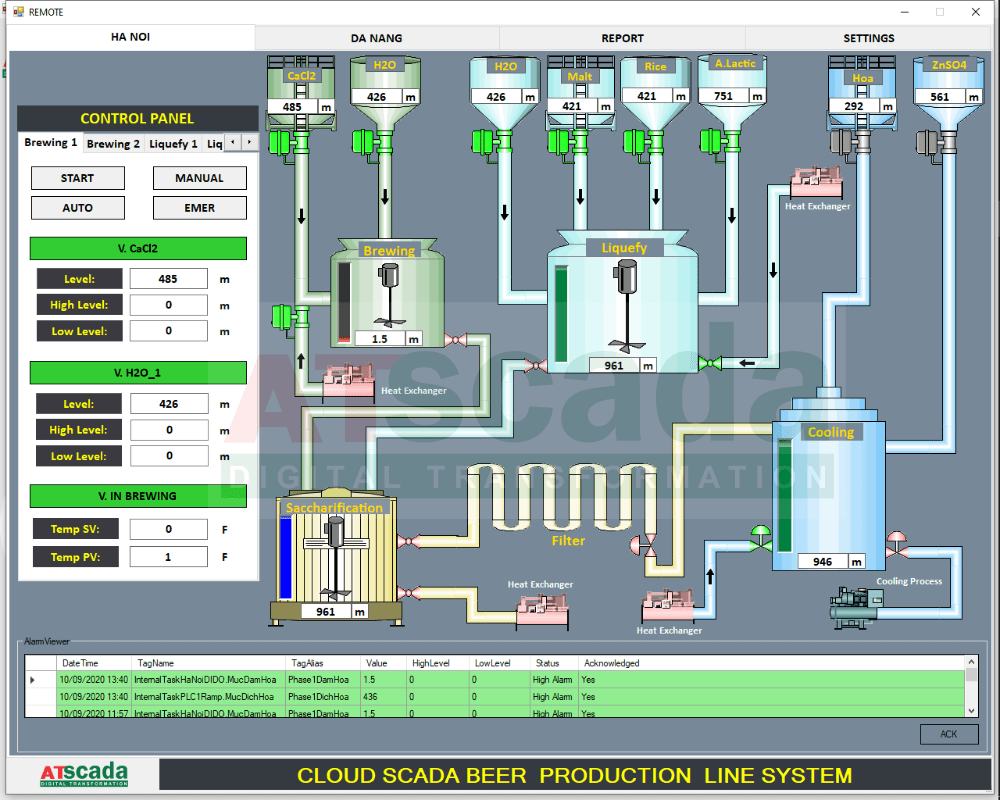
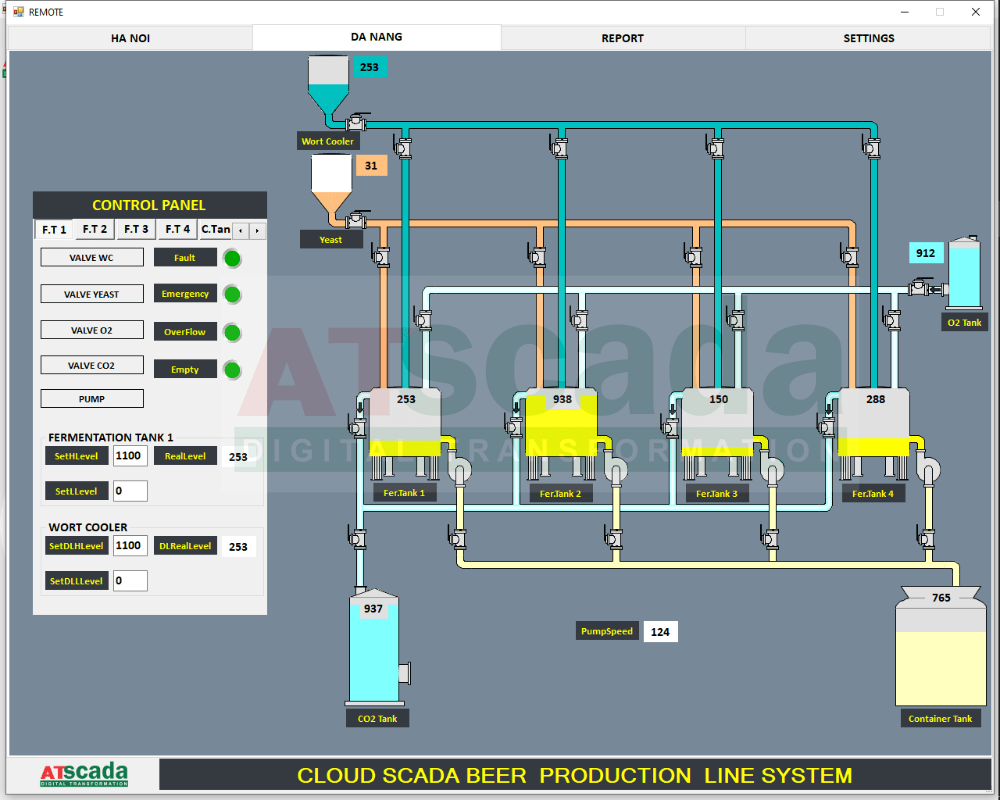
Symbol Factory is a truly useful tool for automation engineers. If you have any questions, please contact us via hotline for the fastest support. ATSCADA Lab sincerely thanks you and looks forward to serving you with solutions based on SCADA symbols.
ATSCADA - Providing ATSCADA software - The monitoring and data acquisition control system is the appropriate choice for integrated system projects, IoT, smart city projects, agriculture 4.0... Is trusted by many customers.
Related posts
UART Communication Explained: Working Principle and Applications
Electronic applications widely use UART communication to transfer data between devices such as computers, microcontrollers, [...]
Mar
Domain, Hosting, VPS, Cloud Server & SSL for SCADA Systems (ATSCADA Platform)
In the era of Industry 4.0, deploying SCADA systems on Web and Cloud platforms is [...]
Oct
SSL Certificate for SCADA Web – Secure Your ATSCADA System
Protect Your SCADA Web Data with SSL Encryption Ensure that all data exchanged between your [...]
Oct
Register Domain for ATSCADA Web – Secure & Professional Branding
Domain Registration with Viettel IDC A domain name is the unique address of a website [...]
Oct
Viettel Colocation Services for Cloud SCADA Systems – Secure, Scalable & High-Performance Infrastructure
For large-scale Cloud SCADA and IIoT systems, choosing the right infrastructure is critical to ensure [...]
Oct
Viettel Cloud VPS Server – Secure & Scalable Hosting for Cloud SCADA and IIoT Systems
The Viettel Cloud VPS (Virtual Private Server) service from Viettel IDC is widely trusted for [...]
Oct