
Technical Guides
Using Symbol Factory in SCADA Software for SCADA Symbols Design
Using Symbol Factory in SCADA software is an excellent solution if you want to design HMI or SCADA systems professionally. Let’s explore the details in the article below and discover how to optimize your design with SCADA symbols.
What is Symbol Factory?
Symbol Factory is a graphics library with nearly 4,000 high-quality scalable vector graphics (SVG) for projects. The library is commonly used for control elements such as pipelines, mixers, switches, lights, and buttons—making it highly effective for designing SCADA symbols.
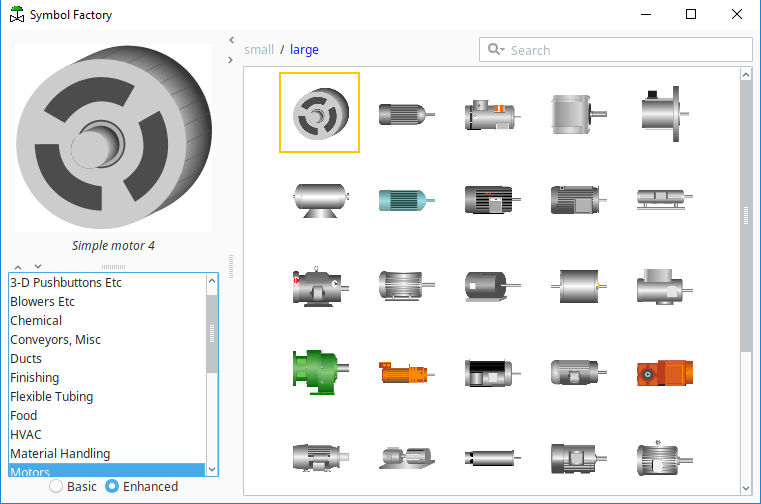
It is suitable for application design on mobile devices or any deployment platform, allowing users to view HMI and SCADA on screens of various sizes while maintaining consistent SCADA symbols.
- Integrate objects into applications in various formats, including metafile, bitmap (.bmp), SVG, VML, or PNG.
- Works with multiple file types such as WMF, EMF, BMP, PNG, SVG, and VML.
- The Librarian application provides easy-to-use features for resizing, adjusting color palettes, and changing object orientation. It also allows users to create custom categories and import their own graphics into the library. Graphics can be imported from vector WMF (Windows Metafile) or BMP formats—making it highly versatile for managing SCADA symbols.
Symbol Factory Tools help you easily create SCADA projects without the need for coding, simplifying the use of SCADA symbols.
- Software compatibility list: The software has been tested to work with Symbol Factory 2.0, including ABB (Advant Graphics Builder), Microsoft Office, National Instruments (BridgeVIEW, LabVIEW, Lookout), Nematron (Paragon), Rockwell Software (RSTools, RSView, RSWorkbench, WinVIEW), Siemens WinCC, WinCC Flexible, Visual Basic, and more—supporting a wide range of SCADA symbols applications.
- Categories: Motors, sensors, tanks, valves, pumps, HVAC, steam, and more.
- Drag-and-drop support: Symbol Factory allows users to drag icons from the software and drop them into other applications or vice versa, similar to copy and paste.
- Image optimization: The size and complexity of metafile data can be reduced using the new image optimization feature, improving performance when working with SCADA symbols.
iSymbolFactory integrates Symbol Factory tools into the ATSCADA application, enabling efficient use of SCADA symbols.
Currently, we can flexibly integrate factory symbols into Visual Studio. This video, created by ATSCADA Lab, provides guidance on adding Symbol Factory into Visual Studio. Video content focuses on using SCADA symbols.
- Guide to using iSymbolFactory integrated into Visual Studio.
-
Key features of Symbol Factory:
- The software is lightweight and can run on low-configuration computers.
- It supports flexible report generation and data export, allowing easy setup of production reports.
- It easily connects to databases (SQL).
Some applications use Visual Studio to connect with PLCs, such as hydropower plants, pumping stations, water treatment systems, DCS systems, and BMS systems—enhancing the use of SCADA symbols.
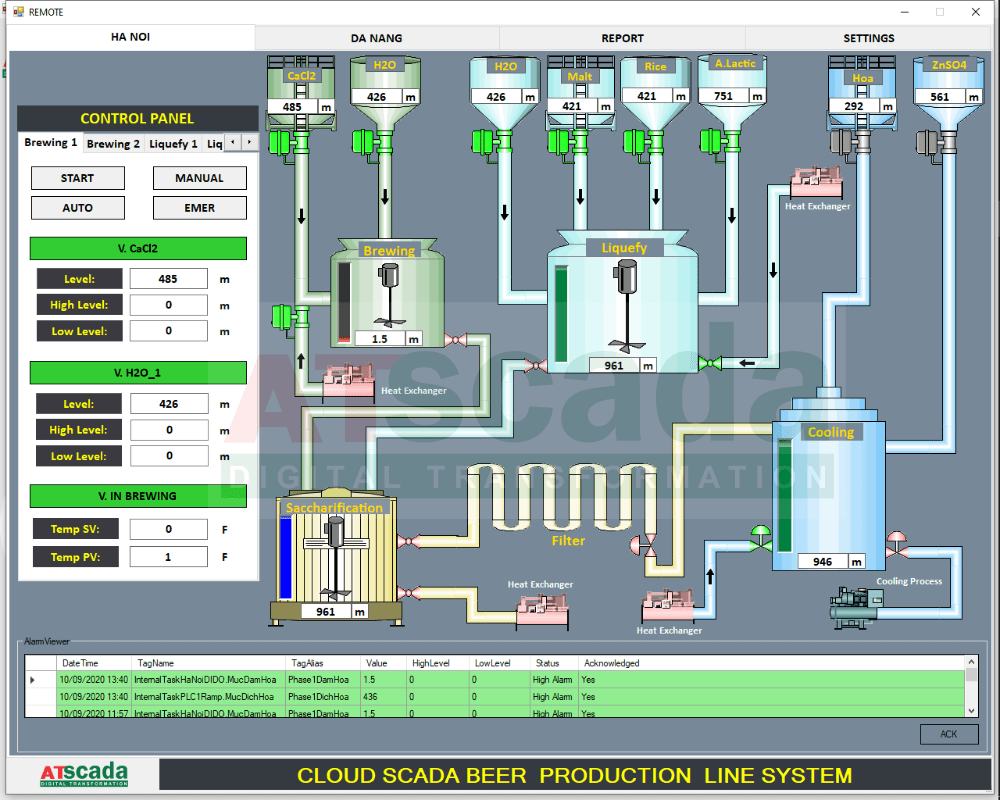
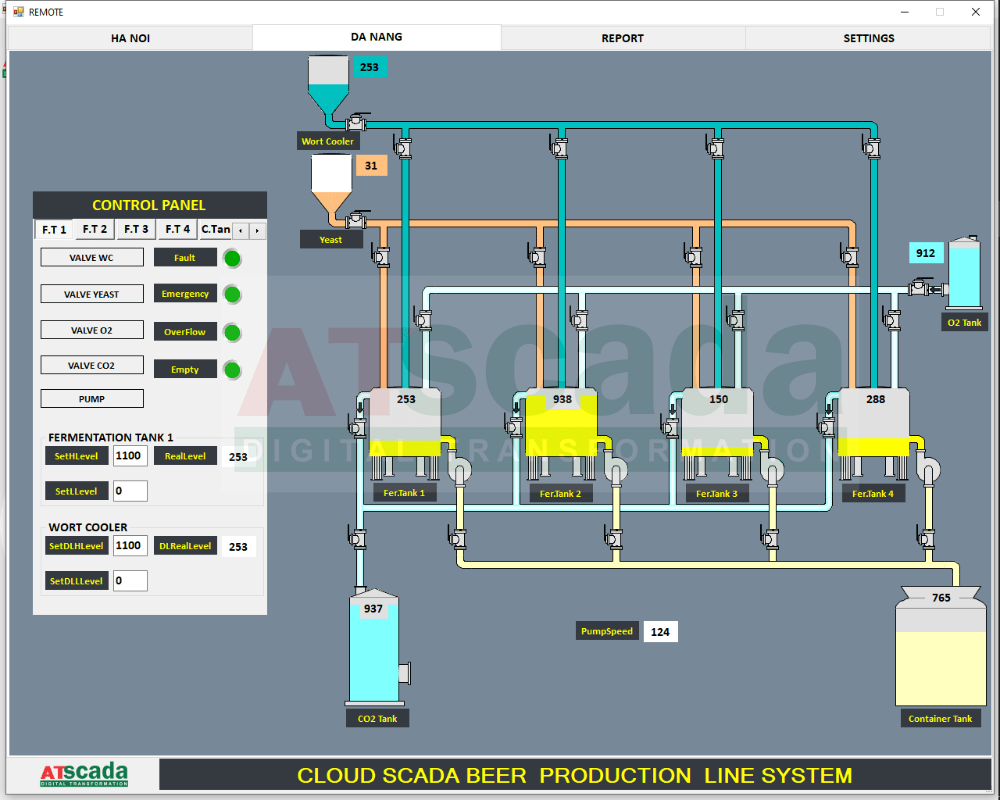
Symbol Factory is a truly useful tool for automation engineers. If you have any questions, please contact us via hotline for the fastest support. ATSCADA Lab sincerely thanks you and looks forward to serving you with solutions based on SCADA symbols.

ATSCADA - Smart SCADA Software with AI Predictor & Blockchain. ATSCADA is an advanced SCADA software platform for real-time monitoring, intelligent control, and efficient data acquisition. It is ideal for Industrial IoT (IIoT), smart cities, integrated automation systems, and Agriculture 4.0. With a built-in AI Predictor, ATSCADA enables predictive analytics to detect issues early, optimize performance, and reduce downtime. The integration of Blockchain technology ensures secure, transparent, and tamper-proof data management. Highly scalable and easy to integrate, ATSCADA is trusted by businesses to enhance productivity, strengthen cybersecurity, and accelerate digital transformation.
Related articles
Utility SCADA Systems for Power, Water, and Infrastructure Management
In today’s rapidly evolving industrial landscape, Utility SCADA Systems play a critical role in managing [...]
Apr
Cost of a SCADA System: Complete Pricing Guide
Understanding the Cost of a SCADA System is essential for businesses planning to implement or [...]
Apr
SCADA Software Price: Complete Cost Guide for Industrial Systems
Understanding SCADA software price is essential for any organization planning to implement or upgrade industrial [...]
Apr
Cheap SCADA Software for Small and Medium Businesses
In today’s competitive industrial landscape, small and medium businesses (SMBs) are under constant pressure to [...]
Apr
Low Cost SCADA Solutions for Efficient Industrial Automation
In today’s competitive industrial landscape, companies are under constant pressure to improve efficiency while minimizing [...]
Apr
Ignition SCADA and AI: Integrating Intelligent Automation into Modern SCADA Systems
In modern industrial environments, Ignition SCADA and AI are increasingly combined to move beyond traditional [...]
Apr