
Technical Guides
SCADA Program Example: How Industrial Systems Are Built
Understanding how a SCADA system works becomes much easier when you look at a real scada program example. Instead of abstract concepts, examples show how data flows, how logic is implemented, and how operators interact with the system.
Modern platforms like ATSCADA make it possible to build SCADA applications faster, with more flexibility and less complexity.
In this guide, we will walk through a practical SCADA program example and explain how each part of the system works in real industrial environments.
What Is a SCADA Program?
A SCADA program is the software logic that connects industrial devices, processes data, and provides visualization for operators.
A typical scada program example includes:
- Data acquisition from sensors and PLCs
- Control logic for automation
- Communication between devices
- Visualization through dashboards
Unlike traditional software, SCADA programs interact directly with physical systems.
Why Study a SCADA Program Example?
Learning through examples helps bridge the gap between theory and practice.
A real scada program example, especially in energy-focused scenarios covered in SCADA energy software guides, allows you to:
- Understand system architecture
- Visualize data flow
- Learn how control logic is structured
- Identify best practices in design
With ATSCADA, developers can quickly turn these concepts into working systems.
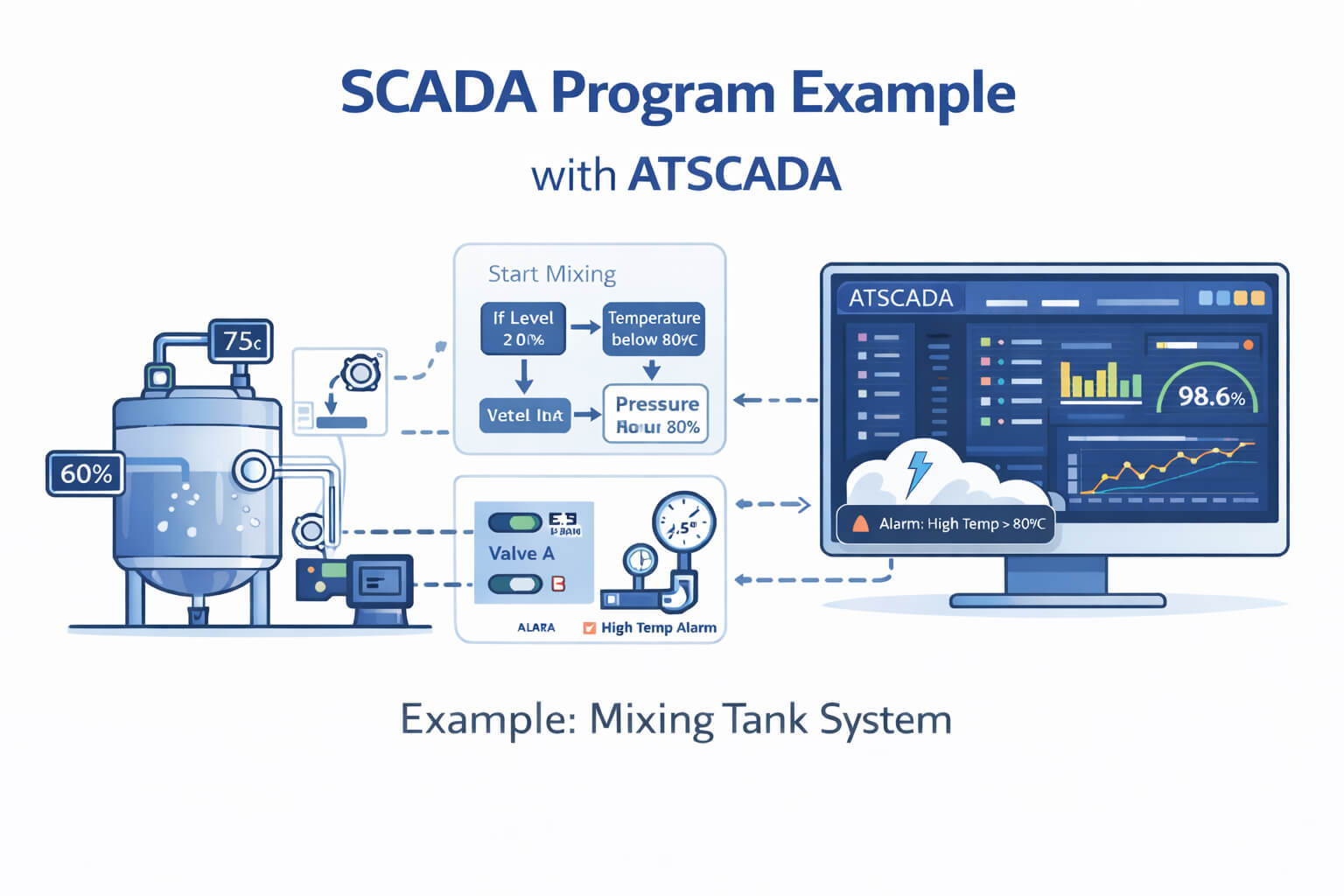
SCADA Program Example: Mixing Tank System
Let’s explore a simple industrial scenario—a mixing tank used in manufacturing.
System Overview
The system includes components typically illustrated in a SCADA software diagram
- Temperature sensor
- Level sensor
- Motor for mixing
- Valve for input/output
- PLC for control
The scada program example will connect all these components.
Data Acquisition
Sensors send real-time data to the PLC.
Example:
- Temperature = 75°C
- Tank level = 60%
ATSCADA collects this data and displays it instantly on dashboards.
Control Logic
The SCADA program defines how the system behaves.
Example logic:
- If temperature > 80°C → stop heating
- If level < 30% → open input valve
- If mixing time > 10 minutes → stop motor
This logic ensures safe and efficient operation.
Visualization
Operators monitor the system through a graphical interface.
Typical dashboard elements:
- Tank level indicator
- Temperature chart
- Motor status (ON/OFF)
- Alarm notifications
ATSCADA provides customizable dashboards for clear visualization.
Alarm and Notification
A good scada program example includes alarm handling.
Examples:
- High temperature alert
- Low level warning
- Equipment failure notification
ATSCADA allows real-time alerts to improve response time.
How ATSCADA Simplifies SCADA Program Development
Traditional SCADA programming can be complex and time-consuming. ATSCADA streamlines the process.
Visual Development Approach
Instead of writing everything from scratch, developers can:
- Configure logic visually
- Map data points easily
- Build dashboards with drag-and-drop tools
Multi-Protocol Integration
ATSCADA supports:
- Modbus
- OPC UA
- MQTT
This makes it easy to connect different devices
Real-Time Performance
Industrial systems require instant feedback.
ATSCADA ensures:
- Low latency data processing
- Fast system response
- Stable communication
Scalable Architecture
A small example can grow into a large system.
ATSCADA allows:
- Adding new devices easily
- Expanding across multiple plants
- Integrating with cloud systems
Best Practices When Building a SCADA Program Example
To create an effective SCADA system, follow these guidelines:
Keep Logic Simple
Avoid overly complex control logic. Simplicity improves reliability.
Design Clear Interfaces
Operators should understand the system at a glance.
Use Modular Architecture
Break the system into smaller, manageable components.
Ensure Data Accuracy
Reliable sensors and correct calibration are critical.
Plan for Scalability
Even a small scada program example should be designed with future expansion in mind.
Common Mistakes to Avoid
When working with a SCADA program example, developers often make these errors:
- Overloading dashboards with too much information
- Ignoring alarm management
- Poor communication setup between devices
- Lack of system documentation
Using ATSCADA helps minimize these issues through structured development tools.
The Future of SCADA Programming
SCADA systems are evolving rapidly.
Key trends include:
- AI-driven automation
- Cloud-based SCADA platforms
- Edge computing
- Digital twin integration
ATSCADA continues to evolve with these technologies, helping developers build future-ready systems.
Conclusion
A scada program example provides valuable insight into how industrial systems are designed and operated. From data acquisition to control logic and visualization, each component plays a critical role.
With ATSCADA, developers can build SCADA programs faster, more efficiently, and with greater flexibility.
Whether you are a beginner or an experienced engineer, studying and implementing SCADA program examples is essential for mastering industrial automation.

ATSCADA - Smart SCADA Software with AI Predictor & Blockchain. ATSCADA is an advanced SCADA software platform for real-time monitoring, intelligent control, and efficient data acquisition. It is ideal for Industrial IoT (IIoT), smart cities, integrated automation systems, and Agriculture 4.0. With a built-in AI Predictor, ATSCADA enables predictive analytics to detect issues early, optimize performance, and reduce downtime. The integration of Blockchain technology ensures secure, transparent, and tamper-proof data management. Highly scalable and easy to integrate, ATSCADA is trusted by businesses to enhance productivity, strengthen cybersecurity, and accelerate digital transformation.
Related articles
Utility SCADA Systems for Power, Water, and Infrastructure Management
In today’s rapidly evolving industrial landscape, Utility SCADA Systems play a critical role in managing [...]
Apr
Cost of a SCADA System: Complete Pricing Guide
Understanding the Cost of a SCADA System is essential for businesses planning to implement or [...]
Apr
SCADA Software Price: Complete Cost Guide for Industrial Systems
Understanding SCADA software price is essential for any organization planning to implement or upgrade industrial [...]
Apr
Cheap SCADA Software for Small and Medium Businesses
In today’s competitive industrial landscape, small and medium businesses (SMBs) are under constant pressure to [...]
Apr
Low Cost SCADA Solutions for Efficient Industrial Automation
In today’s competitive industrial landscape, companies are under constant pressure to improve efficiency while minimizing [...]
Apr
Ignition SCADA and AI: Integrating Intelligent Automation into Modern SCADA Systems
In modern industrial environments, Ignition SCADA and AI are increasingly combined to move beyond traditional [...]
Apr