
SCADA Software
ATSCADA iEnergy– Smart Energy Monitoring and Management System
ATSCADA iEnergy Tools is an extension library (plugin) for the ATSCADA SCADA system, working alongside the ATSCADA iLean Tools suite and designed for:
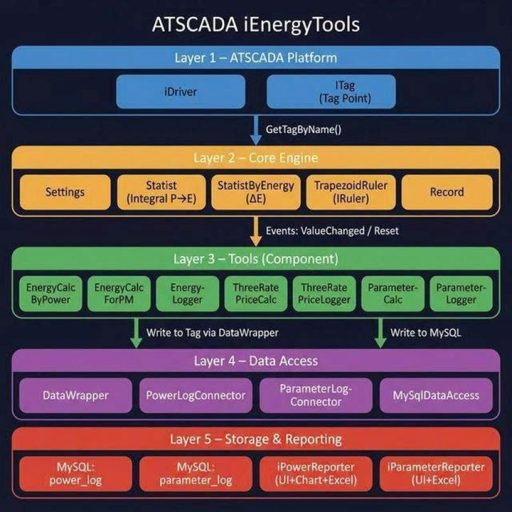
- Energy calculation from real-time power values using the trapezoidal integration method
- Three-tier electricity cost calculation (peak, off-peak, normal hours)
- Parameter statistics (Min, Max, Average) by time cycle
- Automatic data logging to MySQL
- Reporting with DataGridView and charts, including Excel export
Core Formula:
Energy (E) = ∫ P(t) dt ≈ Σ [(P_i + P_{i+1}) / 2] × Δt (Trapezoidal Rule Formula)
Overall Architecture Diagram:
SYSTEM PREPARATION AND INSTALLATION
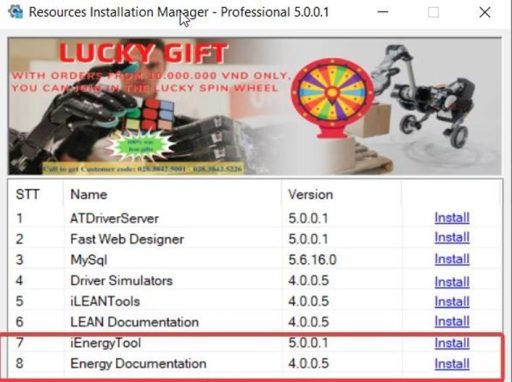
Step 1: Install the iEnergyTools Package
Open the Resources Installation Manager software.
Find the iEnergyTools package (Version 5.0.0.1).
Click the Install button.
When the Setup window appears, click Install → Finish to complete the installation of ATSCADA iEnergy.
USER INTERFACE DESIGN IN VISUAL STUDIO
Step 2: Integrate iEnergyTools into the Toolbox
Open Visual Studio and create a Windows Forms App (.NET Framework) project.
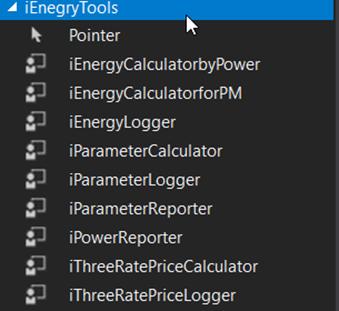
In the Toolbox panel, right-click and select Add Tab, then name it ATSCADA iEnergyTools.
Right-click the newly created tab and choose Choose Items…
Click Browse, then navigate to the installation path:
C:\Program Files\ATPro\ATSCADA\iEnegryTools\iEnegryTools.dll.
Click OK. The tool icons such as iEnergyCalculatorbyPower, iEnergyLogger, and iPowerReporter will appear in the Toolbox for ATSCADA iEnergy integration.
PROJECT DEMO USING ATSCADA IENERGYTOOLS AND DETAILED TOOL GUIDE
iEnergyCalculatorbyPower
- Purpose: Calculate energy consumption (kWh) from power input (kW) using the trapezoidal integration method. The result is written directly to the SCADA Tag, supporting historical energy storage across time points (last energy) with ATSCADA iEnergy.
- Description: Drag iEnergyCalculatorbyPower onto the Form.
- Configuration Parameters (Properties):
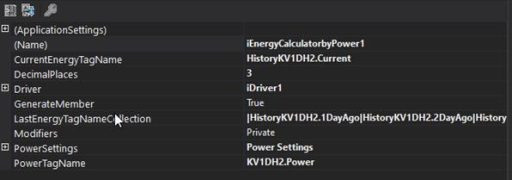
- CurrentEnergyTagName (string): Name of the Tag used to store the current calculated energy value. In each cycle, the integrated result will be written to this Tag for ATSCADA iEnergy.
- LastEnergyTagNameCollection (string): List of Tags used to store historical energy values, separated by the \| character. Example:
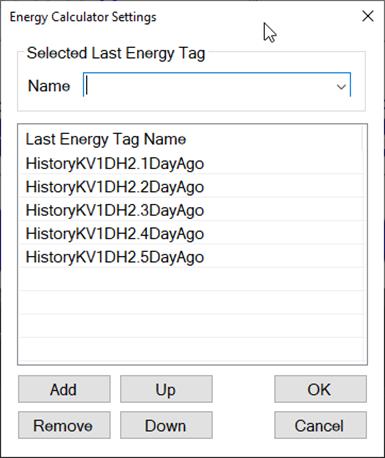
- PowerTagName (string): Name of the input power Tag (P). The value of this Tag is continuously sampled to calculate energy integration for ATSCADA iEnergy.
- DecimalPlaces: Number of decimal places when writing the result. Default: 3.

iEnergyCalculatorforPM
- Purpose: Calculate energy using the accumulated Energy value from a Power Meter. Unlike iEnergyCalculatorbyPower (which calculates from power input P), this tool directly reads the accumulated energy value and calculates deltaEnergy between each reading for ATSCADA iEnergy.
- Description: Drag iEnergyCalculatorforPM onto the Form.
- Configuration Parameters (Properties):
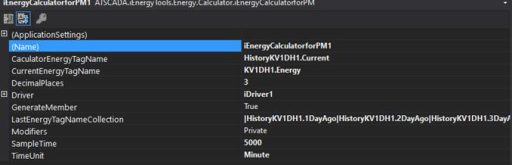
CaculatorEnergyTagName (string): Name of the Tag used to store the calculated energy value (output) for ATSCADA iEnergy.
CurrentEnergyTagName (string): Name of the Tag containing the accumulated energy value read from the meter (input).
LastEnergyTagNameCollection (string): List of Tags used to store historical energy values, separated by the | character.
Example:
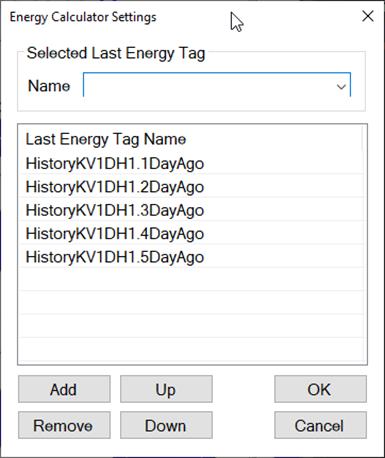
DecimalPlaces: Number of decimal places when writing the result. Default: 3 for ATSCADA iEnergy.
Calculation Principle:
deltaEnergy = currentEnergy (read from the meter) – lastEnergy (previous reading)
If deltaEnergy < 0 → deltaEnergy = currentEnergy (meter has been reset)
temporaryEnergy += deltaEnergy
Result: The value of CaculatorEnergyTagName is pushed into the LastEnergyTagNameCollection Tag list in ATSCADA iEnergy.

iEnergyLogger
- Purpose: Calculate energy from power input (similar to iEnergyCalculatorbyPower) while automatically logging the results into a MySQL database. Supports two modes: log only on reset or continuous logging when values change in ATSCADA iEnergy.
- Description: Drag iEnergyLogger onto the Form.
- Configuration Parameters (Properties):
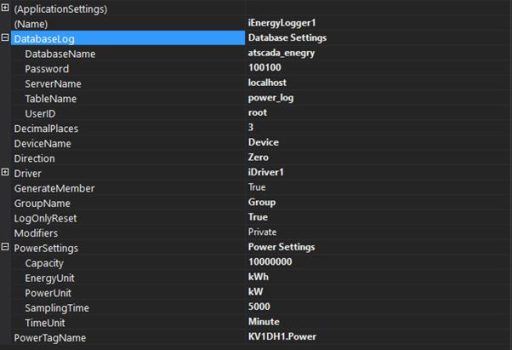
PowerTagName (string): Name of the input power Tag used for power calculation. In each cycle, the integrated value will be written to this Tag for ATSCADA iEnergy.
DatabaseLog (string): MySQL connection configuration.
LogOnlyReset: true = Log only at the cycle reset time. false = Log continuously when the value changes. Default: true.
DeviceName (string): Device name (used for identification in the database). Default: “Device”.
GroupName: Device group name. Default: “Group”.
Direction: Energy flow direction: Positive = 1 (import), Negative = -1 (export), Zero = 0.
DecimalPlaces: Number of decimal places when writing the result. Default: 3.
Result:
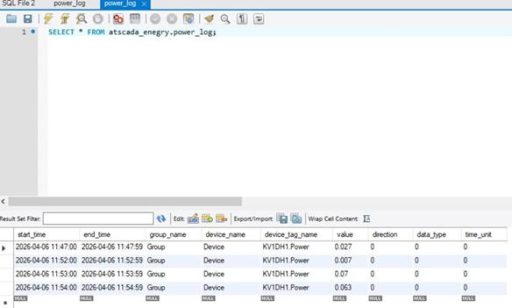
iThreeRatePriceCalculator
- Purpose: Calculate electricity costs based on the three-rate tariff system (peak, normal, off-peak) using power input values. It automatically detects the current time period, applies the correct tariff rate, and writes the result to the SCADA Tag in ATSCADA iEnergy.
- Description: Drag iThreeRatePriceCalculator onto the Form.
- Configuration Parameters (Properties):
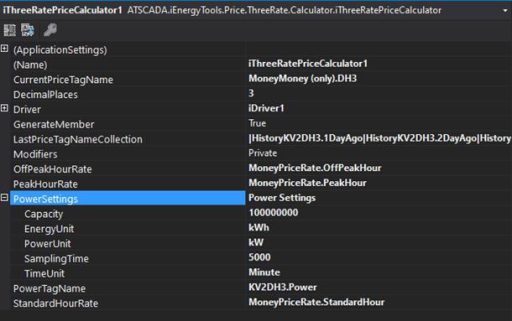
- CurrentPriceTagName (string): Name of the Tag used to store the current calculated electricity cost in ATSCADA iEnergy.
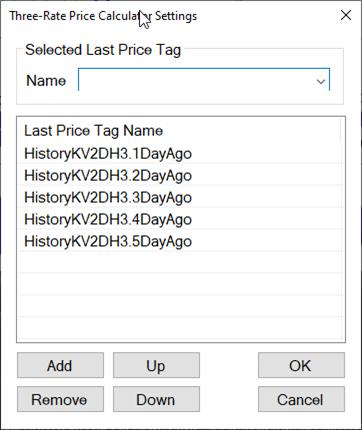
- LastPriceTagNameCollection (string): List of Tags used to store historical electricity cost values, separated by the | character.
- PowerTagName (string): Name of the input power Tag (P) for ATSCADA iEnergy.
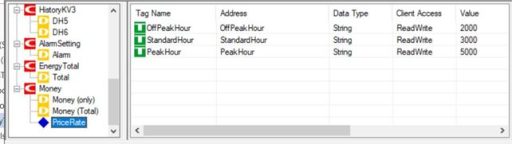
- PeakHourPrice: Peak hour electricity rate (VND/kWh).
- StandardHourPrice: Standard hour electricity rate (VND/kWh).
- OffPeakHourPrice: Off-peak hour electricity rate (VND/kWh).
Decimal Places: Number of decimal places when displaying the result. Default: 3
Result:
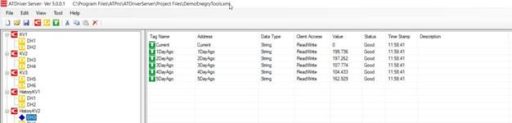
- Calculation Principle:
Electricity Cost = Energy (kWh) × Tariff Rate based on the current time period in ATSCADA iEnergy.
Example: Three-rate schedule (24h):
0:00 – 4:00: Off-peak
4:00 – 9:00: Standard
9:00 – 11:00: Peak
11:00 – 17:00: Standard
17:00 – 20:00: Peak
20:00 – 22:00: Standard
22:00 – 24:00: Off-peak
iThreeRatePriceLogger
Purpose: Combine three-rate electricity cost calculation with automatic MySQL logging (similar to the relationship between iEnergyCalculatorbyPower and iEnergyLogger) in ATSCADA iEnergy.
- Description: Drag iThreeRatePriceCalculator onto the Form.
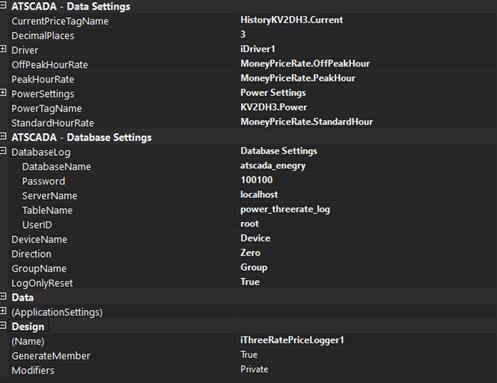
- Configuration Parameters (Properties):
CurrentPriceTagName (string): Name of the Tag used to store the current calculated electricity cost in ATSCADA iEnergy.
LastPriceTagNameCollection (string): List of Tags used to store historical electricity cost values, separated by the | character.
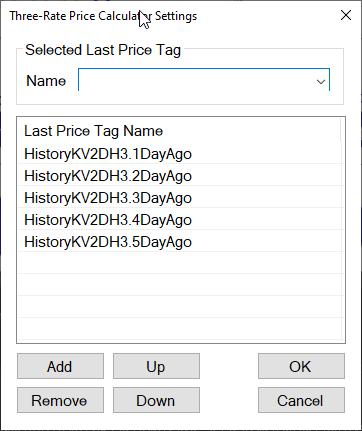
- PowerTagName (string): Name of the input power Tag (P) for ATSCADA iEnergy.
- PeakHourPrice: Peak hour electricity rate (VND/kWh).
- StandardHourPrice: Standard hour electricity rate (VND/kWh).
- OffPeakHourPrice: Off-peak hour electricity rate (VND/kWh).
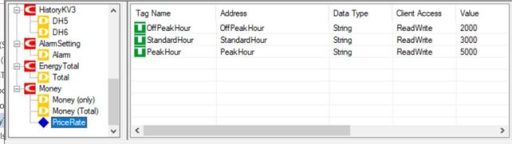
- DecimalPlaces: Number of decimal places when writing the result. Default: 3 for ATSCADA iEnergy.
- DatabaseLog (string): MySQL connection configuration.
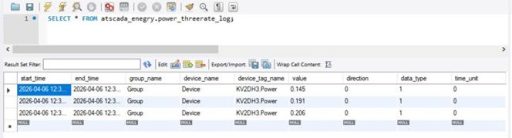
- Result: The calculated three-rate electricity cost for each time period will be stored in the database by ATSCADA iEnergy.
iParameterCalculator
- Purpose: Analyze any physical parameter (temperature, pressure, current, voltage, etc.) within a selected time cycle. It calculates Minimum, Maximum, and Average values, then writes the results to the corresponding SCADA Tags in ATSCADA iEnergy.
- Description: Drag iParameterCalculator onto the Form.
- Configuration Parameters (Properties):
- ParameterSettings (string): Parameter calculation configuration.
- ParameterTagName (string): Name of the input parameter Tag to be analyzed.
- MinimumTagName: Name of the Tag used to store the minimum value (Min) during the cycle.
- MaximumTagName: Name of the Tag used to store the maximum value (Max) during the cycle.
- AverageTagName: Name of the Tag used to store the average value (Avg) during the cycle.
- DecimalPlaces: Number of decimal places when writing the result. Default: 3.
- Example:
Input Tag: Temperature (°C) → ParameterTagName
Hourly Results:
- MinimumTag = 25.3°C
- MaximumTag = 31.7°C
- AverageTag = 28.5°C

iParameterLogger
- Purpose: Analyze parameters (similar to iParameterCalculator) but automatically log Min/Max/Avg results into a MySQL database instead of writing to Tags in ATSCADA iEnergy.
- Description: Drag iParameterLogger onto the Form.
- Configuration Parameters (Properties):
- ParameterSettings (string): Parameter calculation configuration.
- ParameterTagName (string): Name of the input parameter Tag to be analyzed.
- ParameterName: Alias name of the parameter (displayed in the database). Default: “Parameter”.
- DatabaseLog: MySQL connection configuration. Default table: “parameter_log”.
- LogOnlyReset: true = Log only on reset. false = Continuous logging. Default: true.
- DecimalPlaces: Number of decimal places when writing the result. Default: 3.
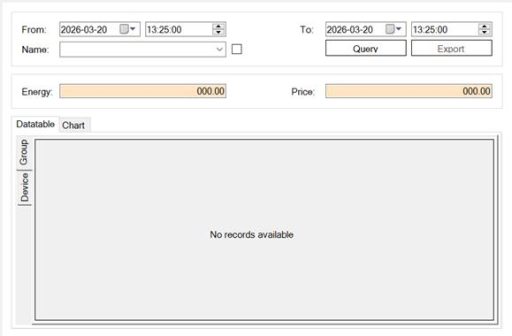
iPowerReporter
- Purpose: UserControl for displaying energy and electricity cost reports with DataGridView tables and real-time SCADA live charts. Supports querying by time range, device group, and time unit. Includes Excel export in ATSCADA iEnergy.
- Description: Drag iPowerReporter onto the Form.
iParameterReporter
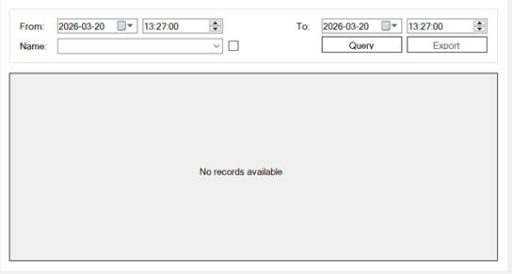
- Purpose: UserControl used to display statistical parameter reports (Min/Max/Avg) from the parameter_log table. It supports querying, DataGridView display, and Excel export in ATSCADA iEnergy.
- Description: Drag iParameterReporter onto the Form.
👉 Learn More about ATSCADA Software

ATSCADA - Smart SCADA Software with AI Predictor & Blockchain. ATSCADA is an advanced SCADA software platform for real-time monitoring, intelligent control, and efficient data acquisition. It is ideal for Industrial IoT (IIoT), smart cities, integrated automation systems, and Agriculture 4.0. With a built-in AI Predictor, ATSCADA enables predictive analytics to detect issues early, optimize performance, and reduce downtime. The integration of Blockchain technology ensures secure, transparent, and tamper-proof data management. Highly scalable and easy to integrate, ATSCADA is trusted by businesses to enhance productivity, strengthen cybersecurity, and accelerate digital transformation.
Bài viết liên quan
ATSCADA AI Predictor Application for Time Series Data Forecasting
Introduction ATSCADA AI Predictor is an artificial intelligence application used for forecasting time series data [...]
Apr
ATSCADA Mobile Alarm Application for SCADA Alerts
The ATSCADA Mobile Alarm Application is a smart mobile solution developed by ATSCADA Lab, designed [...]
Apr
ATSCADA Fastweb -Industrial Web SCADA Applications
iWebService Tool The iWebService tool is a software component developed by ATSCADA Lab, operating in [...]
Apr
ATSCADA IExcelPouringTools – Smart Excel Pouring Data Management for Industrial Automation
ATSCADA IExcelPouringTools is a powerful toolkit designed to generate Excel reports from pre-built templates without [...]
Apr
ATSCADA IWebAPI Tools – Web API Integration Tools for Modern SCADA Systems
The ATSCADA IWebAPI toolset is designed to retrieve data from ATDriver Server and expose it [...]
Apr
ATSCADA IFTP – Advanced FTP File Transfer Tools for Industrial SCADA Systems
ATSCADA IFTP is a specialized FTP communication toolkit designed for industrial automation and environmental monitoring [...]
Apr