
SCADA Software
ATSCADA Authentication: User Account Management Tools for Secure SCADA Systems
Security is one of the most critical requirements in every SCADA system. A reliable authentication mechanism helps prevent unauthorized access, protects operational data, and ensures that only approved users can control industrial processes. ATSCADA Authentication provides a powerful set of tools for creating user accounts, assigning permissions, and maintaining secure access across the entire system.
Within the ATSCADA iTools suite, the iUserAccount toolset includes two important utilities: iCreateUserAccount and iUpdateUserAccount. These tools simplify account creation, role management, and long-term maintenance of SCADA user credentials.
Why ATSCADA Authentication Is Important
Industrial systems require strong security controls to prevent risks such as unauthorized login, accidental configuration changes, and data breaches. By using ATSCADA Authentication, businesses can:
- Protect SCADA operator screens and dashboards
- Control user access based on job roles
- Secure sensitive production and alarm data
- Improve accountability with managed login accounts
- Simplify maintenance and user administration
A secure authentication system is essential for factories, utilities, building automation, and any industrial
iCreateUserAccount – Quickly Create Login Accounts and Roles
a )iCreateUserAccount
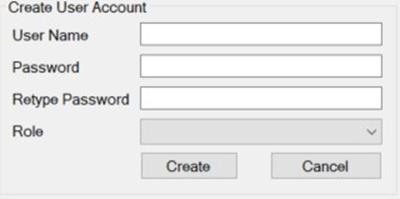
As part of the iTools suite, this tool is designed to quickly create database tables for storing user accounts and managing permissions across the entire system, enhancing security through ATSCADA Authentication.
Important Database Settings for ATSCADA Authentication
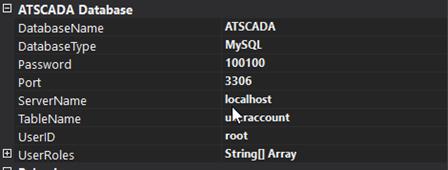
Configure the created database connection by entering the following information: ServerName, Port, and Password. The TableName field represents the user management table that will be automatically created after using the tool.
Example:
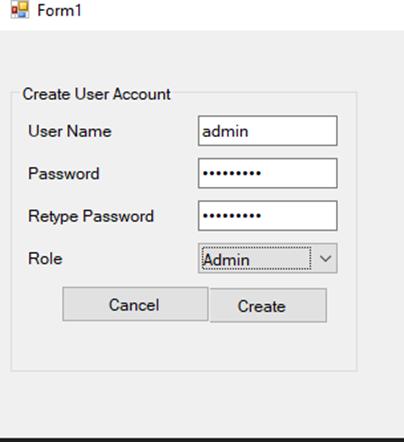
- Username: admin
- Password: ATPro1234560
- Role: Admin
This setup helps manage secure login accounts and user permissions through ATSCADA Authentication.
Verification Process
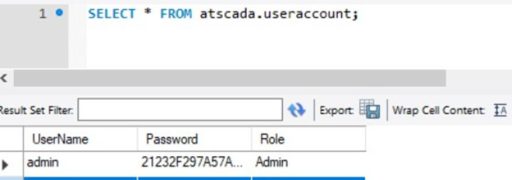
Click Create, then open MySQL to check whether the configured database has been created. If it exists, verify that the UserAccount table is available. Then review the records in the UserAccount table to confirm that the entered username and role are correct.
The password cannot be viewed because it is encrypted when stored in the database for ATSCADA Authentication.
You can also run this command:
SELECT * FROM atscada.useraccount;
to quickly view all records in the UserAccount table.
b) iUpdateUserAccount
Similar to iCreateUserAccount, this tool is included in the iTools suite and is used to update user account data previously created by iCreateUserAccount, helping maintain secure access through ATSCADA Authentication.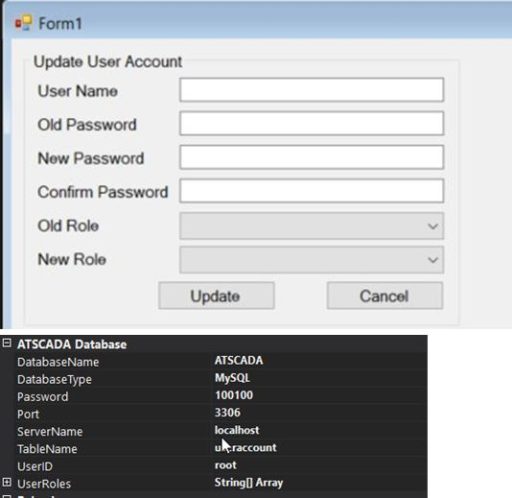
Important Database Settings:
Setup the created Database including ServerName, Port, Password. The TableName is the same as iCreateUserAccount. Example:
Change the previous record from username: admin – password: ATPro1234560 – role: Admin
To username: ChangeUserNameAdminToAdminTest – password: ATPro1234560 – role: Admin for better account management with ATSCADA Authentication.
Result :
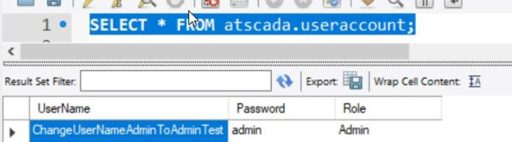
The iUserAccount toolset helps improve system security and simplifies maintenance. It manages UserAccount login credentials with clearly assigned roles, allowing users to operate based on their responsibilities through ATSCADA Authentication.
Key Benefits of ATSCADA Authentication
Using ATSCADA Authentication provides many advantages for industrial operators and system administrators:
Enhanced Security
Passwords are encrypted and stored securely in the database.
Role-Based Access Control
ATSCADA Authentication allows administrators to assign users different permission levels such as:
- Administrator
- Operator
- Engineer
- Supervisor
- Viewer
For systems using ATSCADA iLean Tools to manage production KPIs and OEE dashboards.

Faster User Management
Create, edit, and maintain accounts quickly without manual database operations.
Better System Reliability
Only authorized users can access critical SCADA functions.
Easier Maintenance
User records can be updated anytime as staff roles change.
Ideal Applications of ATSCADA Authentication
ATSCADA Authentication is suitable for:
- Manufacturing plants
- Water treatment systems
- Power and energy facilities using ATSCADA iEnergy monitoring systems
- Building management systems
- Smart factories
- Remote monitoring stations
Any industrial system requiring secure login control can benefit from this solution.
Conclusion
The iUserAccount toolset helps improve system security and simplifies maintenance. It manages UserAccount login credentials with clearly assigned roles, allowing users to operate based on their responsibilities through ATSCADA Authentication.
With tools like iCreateUserAccount and iUpdateUserAccount, ATSCADA delivers a practical and efficient authentication solution for modern SCADA systems.
👉 Learn More about SCADA Sortware

ATSCADA - Smart SCADA Software with AI Predictor & Blockchain. ATSCADA is an advanced SCADA software platform for real-time monitoring, intelligent control, and efficient data acquisition. It is ideal for Industrial IoT (IIoT), smart cities, integrated automation systems, and Agriculture 4.0. With a built-in AI Predictor, ATSCADA enables predictive analytics to detect issues early, optimize performance, and reduce downtime. The integration of Blockchain technology ensures secure, transparent, and tamper-proof data management. Highly scalable and easy to integrate, ATSCADA is trusted by businesses to enhance productivity, strengthen cybersecurity, and accelerate digital transformation.
Bài viết liên quan
ATSCADA AI Predictor Application for Time Series Data Forecasting
Introduction ATSCADA AI Predictor is an artificial intelligence application used for forecasting time series data [...]
Apr
ATSCADA Mobile Alarm Application for SCADA Alerts
The ATSCADA Mobile Alarm Application is a smart mobile solution developed by ATSCADA Lab, designed [...]
Apr
ATSCADA Fastweb -Industrial Web SCADA Applications
iWebService Tool The iWebService tool is a software component developed by ATSCADA Lab, operating in [...]
Apr
ATSCADA IExcelPouringTools – Smart Excel Pouring Data Management for Industrial Automation
ATSCADA IExcelPouringTools is a powerful toolkit designed to generate Excel reports from pre-built templates without [...]
Apr
ATSCADA IWebAPI Tools – Web API Integration Tools for Modern SCADA Systems
The ATSCADA IWebAPI toolset is designed to retrieve data from ATDriver Server and expose it [...]
Apr
ATSCADA IFTP – Advanced FTP File Transfer Tools for Industrial SCADA Systems
ATSCADA IFTP is a specialized FTP communication toolkit designed for industrial automation and environmental monitoring [...]
Apr