
SCADA Software
SCADA system Architecture: ATSCADA System Architecture
A practical SCADA architecture must clearly define how data moves from industrial devices to users. Instead of focusing only on software design, system architecture describes how servers, clients, and networks work together in real operation.
ATSCADA follows a centralized system model where all data is processed on a server and distributed to different types of clients. This structure ensures consistent data handling and reliable system control in modern SCADA software
ATSCADA System Architecture Overview
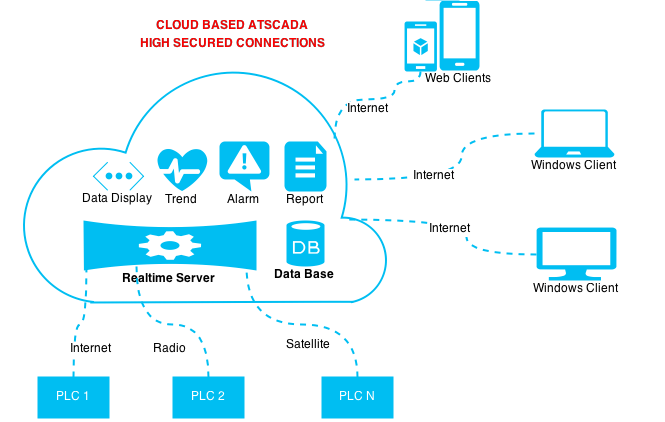
The ATSCADA system is built around a central server that connects industrial devices and user interfaces, based on a flexible SCADA development platform. All components communicate through this server, making it the core of the entire system.
The architecture includes three main parts:
- Server (data processing and control)
- Windows clients (local operation)
- Web clients (remote access)
This structure allows multiple users to access the system simultaneously without conflict.
How the SCADA Architecture Operates
Server and Data Processing
The server collects data from PLCs and field devices, a fundamental concept explained in how SCADA systems work
By centralizing data processing, the system ensures that every client receives the same and most up-to-date information.
Client Access and Control
Users interact with the system through two types of clients, secured by a SCADA login system to control user access and permissions.
- Windows clients are used in control rooms for full monitoring and control.
- Web clients allow remote access through browsers and mobile devices.
As a result, operators can manage the system both locally and remotely during real-world SCADA project implementation
Data Flow in the System
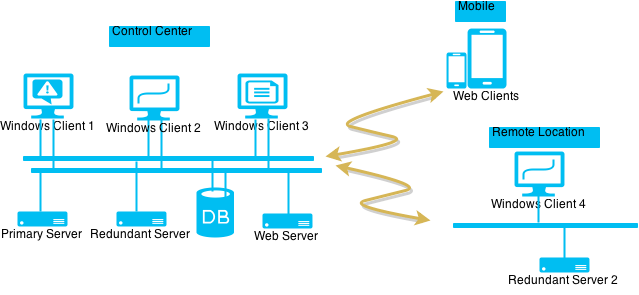
The operation of this SCADA architecture follows a clear sequence:
- Field devices send data to the server
- The server processes and stores the data
- Clients request data from the server
- The server processes and stores the data, including handling SCADA tag events for real-time system updates
This centralized flow keeps all system data synchronized.
Advantages of ATSCADA System Architecture
Consistent Data Handling
All data is processed on a single server, ensuring accuracy across the system.
Flexible Access
Users can access the system from different locations using Windows or web clients.
Scalable Structure
The system can expand by adding more devices or clients without changing the core design.
Efficient Operation
Real-time monitoring allows operators to respond quickly to system changes.
Applications of SCADA Architecture
This SCADA architecture is suitable for industrial environments that require centralized control and distributed access, such as:
- Manufacturing systems
- Energy management
- Water treatment
- Industrial automation
These systems benefit from reliable data processing and flexible monitoring.
Conclusion
The ATSCADA system demonstrates a practical SCADA architecture built around a central server and multiple client types. By separating data processing from user access, the system ensures reliable operation and consistent performance.
This structure provides an effective solution for modern industrial monitoring and control.

ATSCADA - Smart SCADA Software with AI Predictor & Blockchain. ATSCADA is an advanced SCADA software platform for real-time monitoring, intelligent control, and efficient data acquisition. It is ideal for Industrial IoT (IIoT), smart cities, integrated automation systems, and Agriculture 4.0. With a built-in AI Predictor, ATSCADA enables predictive analytics to detect issues early, optimize performance, and reduce downtime. The integration of Blockchain technology ensures secure, transparent, and tamper-proof data management. Highly scalable and easy to integrate, ATSCADA is trusted by businesses to enhance productivity, strengthen cybersecurity, and accelerate digital transformation.
Bài viết liên quan
ATSCADA CookBook: Complete Guide to System Architecture, Tools, Installation & Troubleshooting
The ATSCADA Training book is an essential navigation structure that helps users access all major [...]
Apr
Common ATSCADA Errors and How to Fix Them – FAQ for ATSCADA Tools and Systems
Issues Related to ATDriverServer & iTagBuilder Software Why Does ATDriverServer Not Open? There are two [...]
Apr
ATSCADA Power Management System
Requirements: There are 3 areas that require power management, including a factory, a residential zone, [...]
Apr
ATSCADA Hospital Temperature and Humidity Monitoring Alarm System Project
Requirements: The system includes three monitoring areas: the pharmacy, inpatient warehouse, and cold storage, following [...]
Apr
ATSCADA Project Deployment Guide: Create and Run Projects on Another Computer
ATSCADA Project Deployment is an essential process for transferring a completed SCADA project from the [...]
Apr
How to Create a New Custom Component for Windows Forms Applications
Purpose of the Component This ATSCADA Custom Component is designed to automatically accumulate values from [...]
Apr