
SCADA Software
SCADA Software Architecture: ATSCADA Software Design
In industrial automation, a well-designed SCADA architecture is essential for ensuring system reliability, scalability, and efficient data management. Traditional SCADA systems often rely on closed and rigid structures, which limit integration and expansion, especially compared to modern SCADA software platforms.
However, modern solutions such as ATSCADA adopt an open and flexible architecture. This approach allows seamless communication between components, supports web-based access, and enables scalable system development for Industry 4.0 applications.
What Is SCADA System Architecture?
SCADA architecture refers to the structural design of a SCADA system, including how software components, hardware devices, and communication layers interact with each other.
A typical SCADA architecture consists of:
- Field devices (PLCs, sensors, controllers)
- Communication networks
- SCADA servers
- Human-machine interfaces (HMI)
The main purpose of this architecture is to ensure reliable data collection, processing, and visualization across industrial systems.
ATSCADA Software System Design Overview
ATSCADA is built on a modern SCADA architecture that emphasizes openness, modularity, and scalability. Instead of a monolithic system, it uses multiple independent components that work together efficiently.
This design enables integration with tools such as SCADA support tools , improving flexibility and system control.
- Easy system expansion
- Flexible integration with third-party systems
- Improved system performance and reliability
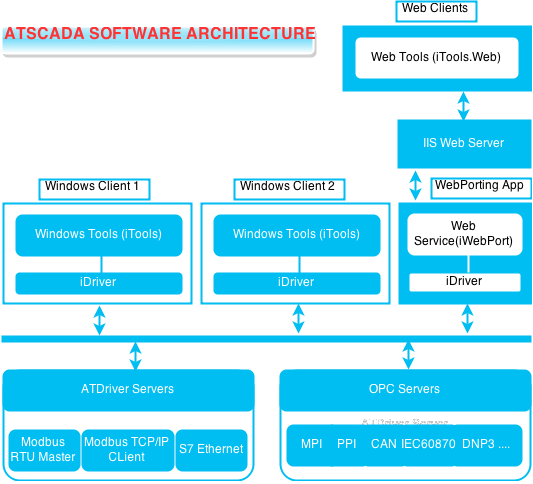
Key Components of ATSCADA Architecture
Open and Modular Architecture
ATSCADA uses an open architecture model, where the system is divided into independent modules.
These modules include:
- Services
- Components
- Plugins
Each module performs a specific function and communicates with others through defined interfaces. Therefore, developers can update or extend the system without affecting the entire structure.
Service-Based Architecture
The system operates using multiple services running on servers. These services handle:
- Data processing and storage, supported by real-time SCADA tools.
- Communication between layers
- Data processing and storage
As a result, the system can operate continuously and efficiently in industrial environments.
Plugin Integration
ATSCADA supports plugin-based development, allowing users to add new features easily.
For example:
- Adding new communication drivers
- Integrating external tools
- Customizing system functions
This makes the system highly adaptable to different industrial needs.
Configuration and Runtime Separation
ATSCADA separates the system into two main parts:
- Configuration: used to design and set up the system
- Runtime: used to execute and operate the system
This separation improves system performance and simplifies maintenance.
Web and Cloud Integration
A modern SCADA architecture must support remote access. ATSCADA integrates:
- Web-based interfaces
- Cloud-based systems
- Mobile access
As a result, users can monitor and control systems from anywhere.
Distributed System Design
ATSCADA supports distributed systems, where multiple control centers operate simultaneously.
This allows:
- Data sharing across locations
- Improved scalability
- Higher system reliability
Therefore, it is suitable for large industrial environments.
Benefits of ATSCADA Architecture
High Flexibility
The modular design allows easy customization and system expansion.
Scalability
The system can grow with industrial demands without major redesign.
Easy Maintenance
Individual components can be updated independently, reducing system downtime.
Strong Integration
ATSCADA integrates easily with:
- PLC systems
- Industrial protocols
- Enterprise software
This also integrates with SCADA alarm management tools to enhance system monitoring.
Applications of SCADA Architecture
Modern SCADA architecture like ATSCADA is widely used in:
- Manufacturing systems
- Energy management
- Water treatment
- Industrial IoT systems
These industries require reliable and scalable automation systems.
Conclusion
A modern SCADA architecture is essential for building efficient and scalable industrial systems. ATSCADA demonstrates how an open, modular, and service-based design can improve flexibility and performance.
By combining web and cloud technologies, ATSCADA provides a powerful solution for modern industrial automation.

ATSCADA - Smart SCADA Software with AI Predictor & Blockchain. ATSCADA is an advanced SCADA software platform for real-time monitoring, intelligent control, and efficient data acquisition. It is ideal for Industrial IoT (IIoT), smart cities, integrated automation systems, and Agriculture 4.0. With a built-in AI Predictor, ATSCADA enables predictive analytics to detect issues early, optimize performance, and reduce downtime. The integration of Blockchain technology ensures secure, transparent, and tamper-proof data management. Highly scalable and easy to integrate, ATSCADA is trusted by businesses to enhance productivity, strengthen cybersecurity, and accelerate digital transformation.
Related articles
ATSCADA iStreamCameraTools – Industrial IP Camera Integration and Real-Time Video Monitoring
The iStreamCameraTools toolkit enables the connection of ONVIF-compatible cameras to receive camera streams and display [...]
Jun
OPC Server Connection Guide
Overview The ATSCADA ecosystem provides exceptional flexibility for integrating data from third-party OPC Servers (such [...]
Jun
Common ATSCADA Errors and How to Fix Them – FAQ for ATSCADA Tools and Systems
Issues Related to ATDriverServer & iTagBuilder Software Why Does ATDriverServer Not Open? There are two [...]
May
ATSCADA Hospital Temperature and Humidity Monitoring Alarm System Project
Requirements: The system includes three monitoring areas: the pharmacy, inpatient warehouse, and cold storage, following [...]
May
ATSCADA CookBook: Complete Guide to System Architecture, Tools, Installation & Troubleshooting
The ATSCADA Training book is an essential navigation structure that helps users access all major [...]
Apr
ATSCADA Power Management System
Requirements: There are 3 areas that require power management, including a factory, a residential zone, [...]
Apr