
Technical Guides
Read and Write Tags in Web SCADA Software with ATSCADA
In modern industrial automation, working with tags is a core function of any web SCADA software. Tags represent real-time data such as temperature, pressure, or system status, allowing operators to monitor and control processes directly through web-based interfaces.
This guide explains how to read and write tags in ATSCADA Web-based systems, helping you build efficient and responsive SCADA applications.
Read and Write Tags in ATSCADA
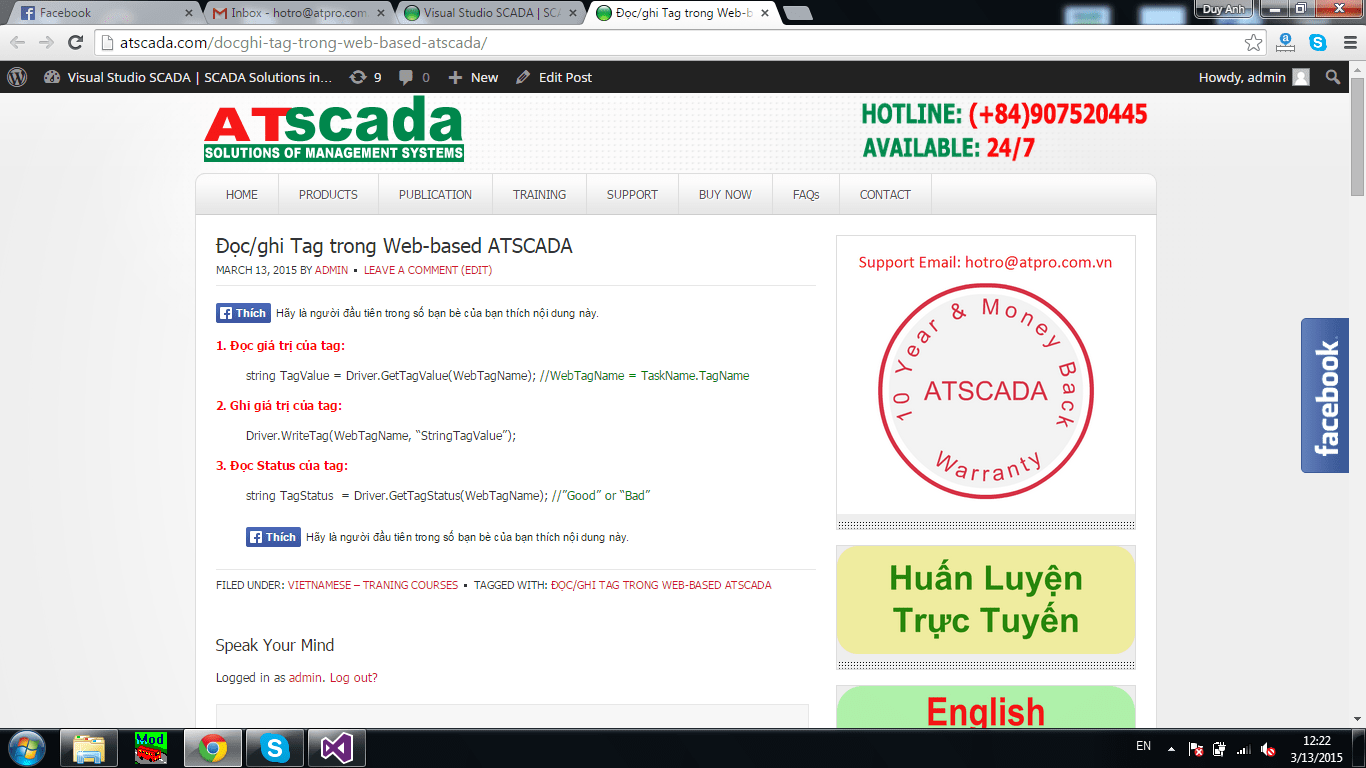
Read Tag Value
string TagValue = Driver.GetTagValue(WebTagName); //WebTagName = TaskName.TagName
Write Tag Value
Driver.WriteTag(WebTagName, “StringTagValue”);
Read Tag Status
string TagStatus = Driver.GetTagStatus(WebTagName); //”Good” or “Bad”
These methods allow developers to interact directly with system data in web SCADA software, enabling real-time monitoring and control.
According to ATSCADA documentation, reading and writing tag values is essential for processing and controlling industrial systems.
How Tag Communication Works
In ATSCADA architecture:
- Driver acts as the communication layer
- Tags are defined as:
TaskName.TagName - Data flows between:
- Web interface
- ATSCADA Server
- PLC or field devices
This structure ensures stable and scalable communication in web SCADA software environments.
Benefits of Using Web SCADA Software
Using web SCADA software like ATSCADA provides several advantages:
- Remote monitoring via web browser
- Real-time data access and control
- Reduced installation (no need for full client software)
- Easy scalability across multiple devices
Web-based SCADA systems are increasingly popular due to their flexibility and ability to operate over the internet.
Best Practices for Tag Handling
To optimize performance in web SCADA software, follow these tips:
- Use clear naming conventions for tags
- Minimize unnecessary read/write operations
- Monitor tag status (Good/Bad) for reliability
- Ensure proper network configuration
Conclusion
Reading and writing tags is a fundamental function in any web SCADA software. With ATSCADA, developers can easily implement tag communication using simple methods, enabling real-time monitoring and control across web platforms.
By applying these techniques, you can build scalable, efficient, and modern SCADA systems for industrial applications 🚀

ATSCADA - Smart SCADA Software with AI Predictor & Blockchain. ATSCADA is an advanced SCADA software platform for real-time monitoring, intelligent control, and efficient data acquisition. It is ideal for Industrial IoT (IIoT), smart cities, integrated automation systems, and Agriculture 4.0. With a built-in AI Predictor, ATSCADA enables predictive analytics to detect issues early, optimize performance, and reduce downtime. The integration of Blockchain technology ensures secure, transparent, and tamper-proof data management. Highly scalable and easy to integrate, ATSCADA is trusted by businesses to enhance productivity, strengthen cybersecurity, and accelerate digital transformation.
Related articles
Utility SCADA Systems for Power, Water, and Infrastructure Management
In today’s rapidly evolving industrial landscape, Utility SCADA Systems play a critical role in managing [...]
Apr
Cost of a SCADA System: Complete Pricing Guide
Understanding the Cost of a SCADA System is essential for businesses planning to implement or [...]
Apr
SCADA Software Price: Complete Cost Guide for Industrial Systems
Understanding SCADA software price is essential for any organization planning to implement or upgrade industrial [...]
Apr
Cheap SCADA Software for Small and Medium Businesses
In today’s competitive industrial landscape, small and medium businesses (SMBs) are under constant pressure to [...]
Apr
Low Cost SCADA Solutions for Efficient Industrial Automation
In today’s competitive industrial landscape, companies are under constant pressure to improve efficiency while minimizing [...]
Apr
Ignition SCADA and AI: Integrating Intelligent Automation into Modern SCADA Systems
In modern industrial environments, Ignition SCADA and AI are increasingly combined to move beyond traditional [...]
Apr