
SCADA Software
What Is SCADA Web Server? Siemens Web-Based SCADA
In the era of Industry 4.0, industrial systems increasingly require remote monitoring and control capabilities.
A SCADA Web Server allows users to access industrial data through a web browser, enabling flexible and efficient system management. Siemens provides such solutions to support real-time monitoring and control in distributed industrial environments.
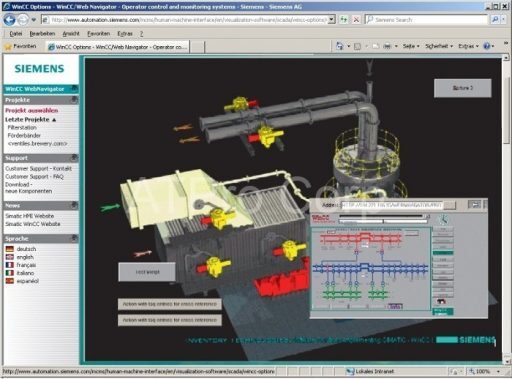
What Is Siemens SCADA Web Server Software?
Siemens SCADA Web Server software is a platform that enables users to design and operate web-based SCADA systems. It allows industrial data to be accessed and controlled remotely through a standard web browser without installing additional software on client devices, similar to SCADA web access tools.
The system typically operates on Windows platforms and connects to industrial equipment such as PLCs and sensors. Data collected from the field is processed by the SCADA server and then delivered through a web interface.
Therefore, users can:
- Monitor system status in real time
- Access data remotely from anywhere
- Control industrial processes through a browser
As a result, Siemens SCADA Web Server improves system flexibility, accessibility, and operational efficiency.
How SCADA Web Server Works
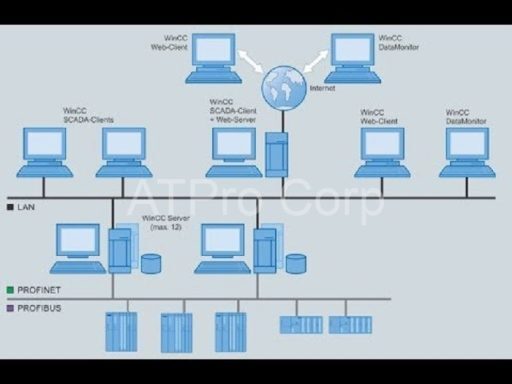
A SCADA Web Server system consists of several main components:
- SCADA server (data processing and control)
- Web server module (data publishing)
- Client devices (PC, tablet, smartphone)
First, field devices such as PLCs and sensors send data to the SCADA server. Then, the web server converts this data into a format accessible via web browsers, , similar to real-time SCADA processing tools.
As a result, users can interact with the system remotely without needing specialized SCADA software installed locally.
Key Features of SCADA Web Server Software
Web-Based Interface
The system provides a browser-based interface, allowing users to access SCADA data easily. Therefore, there is no need to install additional software on each client device.
Real-Time Monitoring
A SCADA Web Server enables real-time monitoring of industrial systems. Users can:
- View live data
- Track system performance
- Monitor alarms and system status
This helps operators respond quickly to system changes.
Data Logging and Storage
The software supports:
- Historical data collection
- Tag-based data logging
- Performance analysis
As a result, users can evaluate system efficiency and optimize operations.
Flexible Interface Design
Users can design custom dashboards and control interfaces that reflect real industrial processes. This improves usability and system visualization.
Integration with Industrial Systems
The system integrates with:
- PLC devices
- Industrial communication protocols through SCADA driver development
- Enterprise systems such as MES and ERP , supported by advanced components like SCADA data integration modules
Therefore, it can be applied to various industrial environments.
Remote Access and Control
Users can monitor and control systems remotely through web browsers. This reduces the need for on-site supervision and increases operational flexibility.
Benefits of Using SCADA Web Server
Improved Accessibility
Users can access the system from any location with an internet connection. Therefore, monitoring is no longer limited to control rooms.
Reduced Installation Requirements
Since the system runs on a web browser, there is no need to install SCADA software on multiple devices.
Increased Operational Efficiency
Real-time monitoring helps detect issues early. As a result, downtime is reduced and productivity is improved.
Scalable Architecture
The system can expand easily to support more devices and users, making it suitable for growing industrial systems.
Applications of SCADA Web Server
A SCADA Web Server is widely used in:
- Manufacturing systems
- Energy and power management
- Water and wastewater treatment
- Building automation systems
These industries require continuous monitoring and remote access to ensure efficient operation.
Best Practices for Implementation
To ensure optimal performance, engineers should also leverage SCADA training resources to better understand system configuration and deployment:
- Use a stable and secure network
- Implement authentication and access control
- Monitor system performance regularly
- Plan for future system expansion
Conclusion
A SCADA Web Server is a powerful solution that enables web-based monitoring and control for industrial systems. Siemens SCADA software provides flexible access, real-time data visualization, and scalable architecture.
As industries continue to adopt digital transformation, web-based SCADA systems will play a critical role in improving efficiency and system management.

ATSCADA - Smart SCADA Software with AI Predictor & Blockchain. ATSCADA is an advanced SCADA software platform for real-time monitoring, intelligent control, and efficient data acquisition. It is ideal for Industrial IoT (IIoT), smart cities, integrated automation systems, and Agriculture 4.0. With a built-in AI Predictor, ATSCADA enables predictive analytics to detect issues early, optimize performance, and reduce downtime. The integration of Blockchain technology ensures secure, transparent, and tamper-proof data management. Highly scalable and easy to integrate, ATSCADA is trusted by businesses to enhance productivity, strengthen cybersecurity, and accelerate digital transformation.
Related articles
Common ATSCADA Errors and How to Fix Them – FAQ for ATSCADA Tools and Systems
Issues Related to ATDriverServer & iTagBuilder Software Why Does ATDriverServer Not Open? There are two [...]
May
ATSCADA Hospital Temperature and Humidity Monitoring Alarm System Project
Requirements: The system includes three monitoring areas: the pharmacy, inpatient warehouse, and cold storage, following [...]
May
ATSCADA CookBook: Complete Guide to System Architecture, Tools, Installation & Troubleshooting
The ATSCADA Training book is an essential navigation structure that helps users access all major [...]
Apr
ATSCADA Power Management System
Requirements: There are 3 areas that require power management, including a factory, a residential zone, [...]
Apr
ATSCADA Project Deployment Guide: Create and Run Projects on Another Computer
ATSCADA Project Deployment is an essential process for transferring a completed SCADA project from the [...]
Apr
How to Create a New Custom Component for Windows Forms Applications
Purpose of the Component This ATSCADA Custom Component is designed to automatically accumulate values from [...]
Apr