
SCADA Demonstration: ATSCADA Demonstration Project Overview

SCADA Demonstration is essential for engineers and developers who want to learn how to design, implement, and deploy industrial automation systems. Instead of working directly on real industrial environments, training platforms provide a safe and practical way to explore SCADA functionalities. To better understand how these systems are structured in practice, learners can explore a complete software environment used to build and operate SCADA systems.

ATSCADA supports this learning approach through demonstration projects such as ATSCADA Demonstration 10, which provide hands-on experience in building and operating SCADA systems.
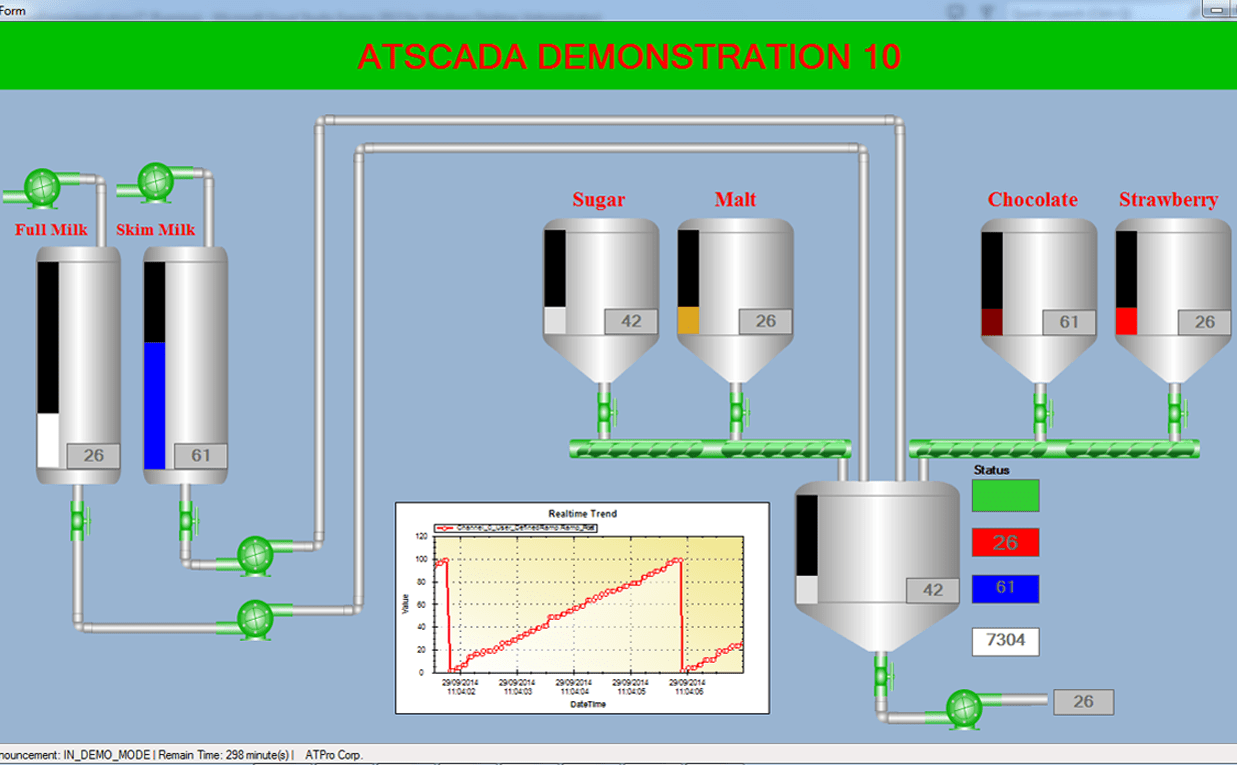
ATSCADA DEMONSTRATION 10


Overview of ATSCADA Demonstration 10

ATSCADA Demonstration 10 is a sample SCADA project designed for training and demonstration purposes. It allows users to explore how a complete SCADA system is structured and implemented.

According to the original content, the demo includes:

  • A demonstration project for learning ATSCADA
  • Video references for guidance
  • Downloadable project files for hands-on practice

This makes it a practical resource for both beginners and advanced users.

Learning SCADA System Development Through Demo Projects

Demonstration projects like ATSCADA Demonstration 10 help users understand how SCADA systems work in real scenarios.

Through hands-on practice, users can learn:

  • How to design SCADA interfaces (HMI)
  • How to configure data acquisition, tags, and SCADA tag events
  • How to connect SCADA with industrial devices
  • How to build monitoring and control logic

Through hands-on practice, users can also understand how real-time monitoring works in distributed environments, such as in web-based real-time SCADA monitoring interfaces.

Key Components in the Demonstration Project

The ATSCADA demonstration project reflects a typical SCADA architecture, including:

  • User Interface (HMI) for visualization
  • Data layer for real-time data processing
  • Communication layer for device connectivity
  • Control logic for system operation

These components mirror real-world implementations where visualization, control, and data processing are combined through interactive SCADA HMI visualization dashboards.

Video-Based Learning and Practical Training

A key feature of ATSCADA training resources is the use of video tutorials.

Users can:

  • Follow step-by-step instructions
  • Visualize system setup and configuration
  • Learn faster through practical examples

This combination of video + downloadable project creates a complete learning environment.

Benefits of Using SCADA Demonstration Projects

Using demonstration projects like ATSCADA Demonstration 10 provides several advantages:

  • Hands-On Experience: Learn by doing instead of theory
  • Faster Learning Curve: Understand system behavior quickly
  • Safe Testing Environment: No risk to real industrial systems
  • Practical Skills Development: Apply knowledge directly

These benefits make SCADA training more effective and accessible.

Use Cases for SCADA Demonstration

SCADA Demonstration is widely used in:

  • Engineering education
  • Industrial training programs
  • System integrator onboarding
  • Research and development

ATSCADA demonstration projects can support all these use cases by providing a flexible learning platform.

Integration with ATSCADA Ecosystem

The demonstration project is not isolated—it reflects the full ATSCADA ecosystem, including:

  • Real-time data processing (iDriver)
  • Visualization tools (HMI components)
  • Web-based monitoring tools
  • Alarm and event systems

This helps users understand how all modules work together in a real SCADA environment.

Video reference

Conclusion

SCADA Demonstration plays a vital role in developing practical skills for industrial automation. ATSCADA Demonstration 10 provides a hands-on learning experience that allows users to explore real SCADA system design, configuration, and operation.

By combining downloadable projects with video-based learning, ATSCADA offers an effective way to learn and apply SCADA technologies in modern industrial systems.

ATPro việt nam

ATSCADA - Smart SCADA Software with AI Predictor & Blockchain. ATSCADA is an advanced SCADA software platform for real-time monitoring, intelligent control, and efficient data acquisition. It is ideal for Industrial IoT (IIoT), smart cities, integrated automation systems, and Agriculture 4.0. With a built-in AI Predictor, ATSCADA enables predictive analytics to detect issues early, optimize performance, and reduce downtime. The integration of Blockchain technology ensures secure, transparent, and tamper-proof data management. Highly scalable and easy to integrate, ATSCADA is trusted by businesses to enhance productivity, strengthen cybersecurity, and accelerate digital transformation.

Related articles

Common ATSCADA Errors and How to Fix Them – FAQ for ATSCADA Tools and Systems

Issues Related to ATDriverServer & iTagBuilder Software Why Does ATDriverServer Not Open? There are two [...]

ATSCADA Hospital Temperature and Humidity Monitoring Alarm System Project

Requirements: The system includes three monitoring areas: the pharmacy, inpatient warehouse, and cold storage, following [...]

ATSCADA CookBook: Complete Guide to System Architecture, Tools, Installation & Troubleshooting

The ATSCADA Training book is an essential navigation structure that helps users access all major [...]

ATSCADA Power Management System

Requirements: There are 3 areas that require power management, including a factory, a residential zone, [...]

ATSCADA Project Deployment Guide: Create and Run Projects on Another Computer

ATSCADA Project Deployment is an essential process for transferring a completed SCADA project from the [...]

How to Create a New Custom Component for Windows Forms Applications

Purpose of the Component This ATSCADA Custom Component is designed to automatically accumulate values from [...]

T.Vấn Zalo(t.Việt)
ATSCADA Profile.
WhatsApp ( Eng.)
Map (chỉ đường.)