
SCADA Software
Cloud ATSCADA Security System Architecture for Industrial SCADA Protection
The Cloud ATSCADA Security System is the cloud-based evolution of traditional SCADA for the Industry 4.0 era. Also known as IoT/IIoT SCADA, this system enables users to monitor and control industrial operations remotely anytime and anywhere.
Based on the original ATSCADA architecture and modern ATSCADA software structure, the platform combines cloud computing, remote connectivity, and industrial cybersecurity to ensure secure operations across both IT and OT environments.
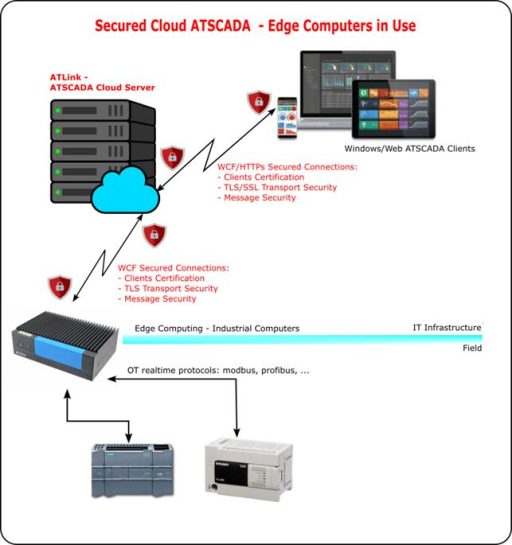
Distributed Cloud SCADA System Architecture
The Cloud ATSCADA Security System includes four main components.
Cloud Server (ATLink)
The Cloud Server, called ATLink, acts as the central core of the system. It processes two-way data communication, manages large data volumes, and stores information in the central database.
ATLink also coordinates communication between field devices and remote users.
Cloud Gateway
The Cloud Gateway connects plant equipment to the cloud platform through an industrial network smart automation system that enables reliable communication between devices and cloud services.. It may include:
- MQTT Gateway, used to transfer industrial data through MQTT protocol
- Edge Computer, used for local processing to achieve faster response times
This structure improves performance and reduces latency for critical applications.
Field Devices
Field devices are directly connected to the gateway and may include:
- PLCs
- HMIs
- Smart meters
- Sensors
- Industrial instruments
These devices collect operational data and receive commands from the control system.
Remote Clients
Remote clients are web-based or Windows applications running on IT infrastructure. They allow operators and managers to supervise and control the system securely from remote locations.
Cybersecurity Risks in Cloud SCADA
Moving industrial control systems to the cloud provides convenience, but it also creates potential cybersecurity risks. The Cloud ATSCADA Security System is designed to address these threats.
Factory-Level Risks (OT Environment)
Risks inside the factory may come from internal personnel or integration engineers during maintenance activities. Unauthorized access may target PLCs, HMIs, or local control systems.
IT and WAN Risks
External networks are common targets for cyberattacks.
DOS / DDOS Attacks
Attackers may flood the Cloud Server with excessive requests, causing service interruptions and stopping real-time monitoring data flow.
MITM Attacks
In a Man-In-The-Middle attack, hackers intercept communications between system components to steal information or send fake control commands to field devices.
APT / Zero-Day Attacks
Attackers may exploit software vulnerabilities or user behavior such as phishing emails, unsafe browsing, or malware installation to gain control of the system.
SQL Injection
Weak database queries may be exploited to steal production formulas, sensitive records, or user passwords.

ATSCADA Comprehensive Security Solution
The Cloud ATSCADA Security System uses a multi-layer protection model for both IT infrastructure and OT systems.
Security at Device and Factory Level
ATSCADA recommends securing PLCs and HMIs by using password protection, access permissions, and firmware locking.
If remote control is not necessary, direct operation at the factory is recommended to reduce the risk of network-based control attacks.
Security at Cloud Infrastructure Level
ATSCADA uses enterprise-grade servers hosted in professional data centers such as Viettel IDC or equivalent facilities.
Protection measures include:
- High-performance firewalls
- Intrusion Detection Systems (IDS)
- Intrusion Prevention Systems (IPS)
- DOS/DDOS protection
- IP filtering to allow only approved remote clients
Secure Communication and Data Encryption
Cloud Gateway to ATLink
Communication between the gateway and ATLink uses secure protocols such as:
- MQTTs with Client ID, username, password authentication
- Encrypted payload transmission
- TLS/SSL security
ATSCADA may also use Microsoft WCF with encrypted messages and TLS transport security.
ATLink to Remote Clients
Connections between ATLink and remote users are protected through:
- HTTPS SSL encryption
- WCF secure communication
- Client certificate authentication
This ensures only authorized users can access the system.
Benefits of Cloud ATSCADA Security System
The Cloud ATSCADA Security System delivers major advantages:
- Secure remote monitoring anytime, anywhere
- Centralized cloud data management
- Real-time industrial control
- Reduced cyberattack risks
- Encrypted communications
- Flexible IoT and IIoT integration
- Reliable Industry 4.0 infrastructure
Conclusion
The Cloud ATSCADA Security System is a secure cloud SCADA platform built directly from the original ATSCADA distributed architecture. It combines remote accessibility, real-time control, and strong cybersecurity protection.
For factories, utilities, and industrial enterprises moving toward digital transformation, ATSCADA provides a practical and secure path to modern cloud automation.
👉 Learn More about ATSCADA Architecture

ATSCADA - Smart SCADA Software with AI Predictor & Blockchain. ATSCADA is an advanced SCADA software platform for real-time monitoring, intelligent control, and efficient data acquisition. It is ideal for Industrial IoT (IIoT), smart cities, integrated automation systems, and Agriculture 4.0. With a built-in AI Predictor, ATSCADA enables predictive analytics to detect issues early, optimize performance, and reduce downtime. The integration of Blockchain technology ensures secure, transparent, and tamper-proof data management. Highly scalable and easy to integrate, ATSCADA is trusted by businesses to enhance productivity, strengthen cybersecurity, and accelerate digital transformation.
Related articles
ATSCADA iStreamCameraTools – Industrial IP Camera Integration and Real-Time Video Monitoring
The iStreamCameraTools toolkit enables the connection of ONVIF-compatible cameras to receive camera streams and display [...]
Jun
OPC Server Connection Guide
Overview The ATSCADA ecosystem provides exceptional flexibility for integrating data from third-party OPC Servers (such [...]
Jun
Common ATSCADA Errors and How to Fix Them – FAQ for ATSCADA Tools and Systems
Issues Related to ATDriverServer & iTagBuilder Software Why Does ATDriverServer Not Open? There are two [...]
May
ATSCADA Hospital Temperature and Humidity Monitoring Alarm System Project
Requirements: The system includes three monitoring areas: the pharmacy, inpatient warehouse, and cold storage, following [...]
May
ATSCADA CookBook: Complete Guide to System Architecture, Tools, Installation & Troubleshooting
The ATSCADA Training book is an essential navigation structure that helps users access all major [...]
Apr
ATSCADA Power Management System
Requirements: There are 3 areas that require power management, including a factory, a residential zone, [...]
Apr