
SCADA Software
Scada Driver Update – ATDriver Server V2.3
ATDriver Server V2.3 marks an important SCADA driver update, delivering improvements in industrial communication performance, stability, and compatibility with modern PLC systems.
As part of the ATSCADA ecosystem, ATDriver Server plays a critical role in enabling real-time communication between industrial devices and SCADA systems, ensuring reliable data acquisition and control in automation environments.
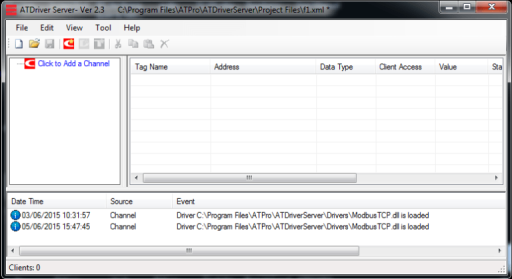
🚀 Overview of ATDriver Server V2.3 Update
This version introduces key enhancements focused on improving communication drivers and expanding device connectivity, building on previous SCADA software updates to enhance overall system performance.
The update strengthens the reliability of existing protocols while adding new capabilities for industrial integration.
According to the official release, ATDriver Server V2.3 focuses on optimizing Modbus communication and expanding Siemens PLC connectivity
Key Features in This SCADA Driver Update
Improved Modbus TCP/IP Driver Stability
The update fixes existing bugs in the Modbus TCP/IP driver, improving communication reliability and reducing data transmission errors in industrial environments.
Enhanced Modbus RTU and TCP Performance
ATDriver Server V2.3 introduces updates to Modbus RTU and TCP protocols, enabling more stable and efficient data exchange between devices and SCADA systems.
New Siemens S7 Ethernet Driver
A major highlight of this scada driver update is the addition of a new S7 Ethernet TCP/IP driver.
This driver enables communication with Siemens PLCs, including:
- S7-300
- S7-400
- S7-1200
- S7-1500
It allows seamless data exchange over Ethernet networks, improving integration in modern industrial automation systems.
Role of ATDriver Server in SCADA Systems
ATDriver Server is a real-time communication engine designed to connect PLCs, industrial devices, and SCADA platforms.
It ensures:
- Continuous data acquisition
- Stable communication between devices
- High-performance data processing
This makes it a core component in building scalable SCADA and industrial IoT systems.
Why This SCADA Driver Update Matters
This update is especially valuable for engineers and system integrators who require:
- Reliable Modbus communication
- Seamless PLC integration
- Improved system stability and stronger SCADA system security in modern industrial environments
- Support for modern Ethernet-based industrial networks
By enhancing both compatibility and performance, ATDriver Server V2.3 helps reduce system downtime and improve overall operational efficiency.
Industrial Applications
With this update, ATDriver Server can be effectively used in:
- Factory automation systems
- SCADA monitoring platforms
- Industrial IoT applications
- Smart manufacturing environments
Its flexible driver architecture allows integration with various devices and protocols, making it suitable for diverse industrial scenarios.
Conclusion
The Scada Driver Update – ATDriver Server V2.3 delivers essential improvements in communication drivers, ensuring better performance, expanded PLC compatibility, and more reliable industrial data exchange.
For businesses and engineers working with SCADA systems, this update provides a stronger foundation for building efficient, scalable, and future-ready automation solutions.

ATSCADA - Smart SCADA Software with AI Predictor & Blockchain. ATSCADA is an advanced SCADA software platform for real-time monitoring, intelligent control, and efficient data acquisition. It is ideal for Industrial IoT (IIoT), smart cities, integrated automation systems, and Agriculture 4.0. With a built-in AI Predictor, ATSCADA enables predictive analytics to detect issues early, optimize performance, and reduce downtime. The integration of Blockchain technology ensures secure, transparent, and tamper-proof data management. Highly scalable and easy to integrate, ATSCADA is trusted by businesses to enhance productivity, strengthen cybersecurity, and accelerate digital transformation.
Related articles
ATSCADA iStreamCameraTools – Industrial IP Camera Integration and Real-Time Video Monitoring
The iStreamCameraTools toolkit enables the connection of ONVIF-compatible cameras to receive camera streams and display [...]
Jun
OPC Server Connection Guide
Overview The ATSCADA ecosystem provides exceptional flexibility for integrating data from third-party OPC Servers (such [...]
Jun
Common ATSCADA Errors and How to Fix Them – FAQ for ATSCADA Tools and Systems
Issues Related to ATDriverServer & iTagBuilder Software Why Does ATDriverServer Not Open? There are two [...]
May
ATSCADA Hospital Temperature and Humidity Monitoring Alarm System Project
Requirements: The system includes three monitoring areas: the pharmacy, inpatient warehouse, and cold storage, following [...]
May
ATSCADA CookBook: Complete Guide to System Architecture, Tools, Installation & Troubleshooting
The ATSCADA Training book is an essential navigation structure that helps users access all major [...]
Apr
ATSCADA Power Management System
Requirements: There are 3 areas that require power management, including a factory, a residential zone, [...]
Apr