
SCADA Applications
SCADA SAAS: The Future of Industrial Automation with ATSCADA Cloud Architecture
In today’s hyper-connected industrial landscape, businesses demand scalable, secure, and cost-efficient control systems. Traditional SCADA deployments are no longer enough. Enter SCADA SAAS — a modern approach that transforms how industries monitor, control, and optimize operations.
This article explores the ATSCADA SAAS architecture, its technical advantages, and how it delivers powerful marketing value for industrial enterprises.
What is SCADA SAAS?
SCADA SAAS is a cloud-based SCADA model where the software is hosted centrally and accessed via web or thin clients. Instead of deploying heavy on-premise systems, businesses can:
- Access SCADA dashboards from anywhere
- Scale infrastructure instantly
- Reduce upfront investment
- Maintain high-level cybersecurity standards
With ATSCADA SAAS, this concept is taken further through a secure MQTT-driven architecture designed for real-time industrial environments.
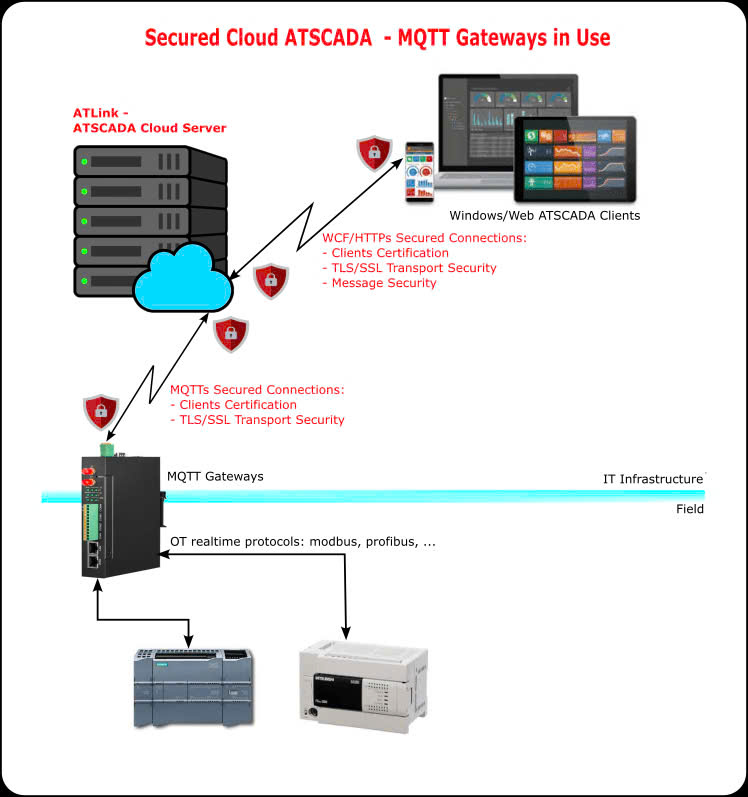
ATSCADA SAAS Architecture Overview
The ATSCADA SAAS system is built on a multi-layer architecture that connects field devices to cloud-based intelligence.
Field Layer (OT – Operational Technology)
At the lowest level, industrial devices such as:
- PLCs
- RTUs
- Sensors and controllers
communicate using real-time protocols like:
- Modbus
- Profibus
- OPC
These devices generate raw operational data.
MQTT Gateway Layer
The MQTT Gateway acts as a bridge between OT and IT systems.
Key functions:
- Converts industrial protocols into MQTT
- Enables lightweight, real-time data transmission and supports industrial data exchange via FTP communication tools
- Reduces bandwidth usage
- Supports edge processing
This layer ensures efficient and reliable data flow from factory floor to cloud.
Secure Cloud Layer (ATSCADA Cloud Server)
This is where the SCADA SAAS platform operates.
Key features:
- Centralized data processing
- Multi-tenant architecture
- High availability and scalability
- Real-time data storage and analytics
Secure Communication Protocols
Security is a critical pillar of SCADA SAAS. ATSCADA implements:
MQTT Secure Connections
- TLS/SSL encryption
- Client authentication
WCF/HTTPS Secure Connections
- Certificate-based authentication
- Encrypted transport (TLS/SSL)
- Message-level security
This ensures end-to-end data protection from field devices to end users.
Client Layer (Web & Windows Interfaces)
Users access the system through:
- Web browsers using modern web SCADA applications,
- Windows SCADA clients
- Mobile dashboards
This allows:
- Remote monitoring
- Real-time control
- Data visualization anywhere, anytime
Key Benefits of ATSCADA SCADA SAAS
1. Reduced Infrastructure Costs
No need for expensive servers or maintenance teams.
2. Scalability on Demand
Easily expand from a single plant to multiple sites.
3. Faster Deployment
Deploy in days instead of months.
4. Enhanced Cybersecurity
Built-in encryption and authentication mechanisms.
5. Centralized Management
Monitor multiple facilities from one platform.

Why SCADA SAAS is a Game-Changer
Traditional SCADA systems have long been the backbone of industrial automation, but they come with significant limitations. These systems are often rigid in design, making it difficult for businesses to adapt to changing operational needs. Expanding or upgrading infrastructure usually requires substantial time, cost, and technical effort.
In addition, maintaining traditional SCADA systems can be expensive. Organizations must invest in hardware, software licenses, and dedicated IT teams to ensure continuous operation. This not only increases operational costs but also slows down innovation.
Scalability is another major challenge. As businesses grow, integrating new facilities or expanding existing systems becomes complex and inefficient with conventional SCADA setups.
This is where SCADA SAAS changes the game. By leveraging cloud-based architecture, SCADA SAAS offers unmatched flexibility, allowing businesses to scale effortlessly, reduce infrastructure costs, and deploy systems faster than ever before. With real-time accessibility and built-in security, it provides a modern solution tailored for today’s industrial demands.
Marketing Value of SCADA SAAS for Businesses
Adopting SCADA SAAS is not just a technical upgrade — it’s a strategic business decision.
1. Faster ROI
Lower upfront cost and quicker implementation mean faster returns.
2. Competitive Advantage
Real-time insights enable smarter decisions and operational efficiency.
3. Global Accessibility
Manage operations across multiple countries from a single dashboard.
4. Future-Proof Technology
Cloud-native architecture supports:
- IoT integration
- AI analytics
- Predictive maintenance
Use Cases of ATSCADA SCADA SAAS
- Solar Farm Monitoring (PMS systems)
- Data Center Infrastructure Monitoring
- Smart Factory Automation
- Water & Wastewater Treatment
- Energy Management Systems
Conclusion
SCADA SAAS is redefining industrial automation, and ATSCADA stands at the forefront with a robust, secure, and scalable cloud architecture.
By combining:
- MQTT-based communication
- Secure cloud infrastructure
- Flexible client access
ATSCADA delivers a next-generation SCADA SAAS platform that empowers businesses to operate smarter, faster, and more efficiently.
👉 Learn More about ATSCADA Software

ATSCADA - Smart SCADA Software with AI Predictor & Blockchain. ATSCADA is an advanced SCADA software platform for real-time monitoring, intelligent control, and efficient data acquisition. It is ideal for Industrial IoT (IIoT), smart cities, integrated automation systems, and Agriculture 4.0. With a built-in AI Predictor, ATSCADA enables predictive analytics to detect issues early, optimize performance, and reduce downtime. The integration of Blockchain technology ensures secure, transparent, and tamper-proof data management. Highly scalable and easy to integrate, ATSCADA is trusted by businesses to enhance productivity, strengthen cybersecurity, and accelerate digital transformation.
Related articles
OEE Monitoring for Manufacturing Performance Improvement
Manufacturers continuously strive to increase productivity, reduce operational losses, and maximize the value of their [...]
Jun
Manufacturing Dashboard for Real Time Production Visibility
Manufacturing companies generate enormous amounts of operational data every day. Production output, machine performance, quality [...]
Jun
Machine Monitoring Software for Smart Manufacturing and Industrial Automation
Manufacturers today face increasing pressure to improve productivity, reduce downtime, and optimize production performance. As [...]
Jun
ATSCADA – Scalable Factory Digitalization Platform from SME to Enterprise
In the era of Industry 4.0, manufacturers are under constant pressure to improve productivity, reduce [...]
Apr
Power Monitoring System Upgrade in Myanmar with ATSCADA
We are proud to announce our new partnership with Logic Master Co., Ltd, our official [...]
Oct
Wood Manufacturing SCADA System for Factory Automation
Wood Factory Digitalization has been a priority for many businesses to implement into their operational [...]
Oct