
SCADA Software
SCADA Driver Development | Native Driver Programming in ATDriver
SCADA driver development is a critical part of industrial automation, allowing SCADA systems to communicate directly with PLCs, sensors, and other field devices within a modern cloud SCADA architecture. In the ATSCADA ecosystem, ATDriver Server provides a powerful foundation for building custom and native drivers with high performance and flexibility.
This article focuses on how to develop a native SCADA driver in ATDriver, including architecture, programming requirements, and practical implementation based on available source code.
Understanding Plug & Play SCADA Driver in ATDriver
ATDriver Server is designed with a Plug & Play driver architecture, allowing developers to easily integrate and extend communication drivers.
Key features:
- Flexible driver integration without restarting the system
- Modular driver design using DLL components
- Easy expansion with custom native drivers
- Compatible with multiple industrial protocols
With this architecture, developers can quickly build and deploy new drivers tailored to specific devices or communication standards.
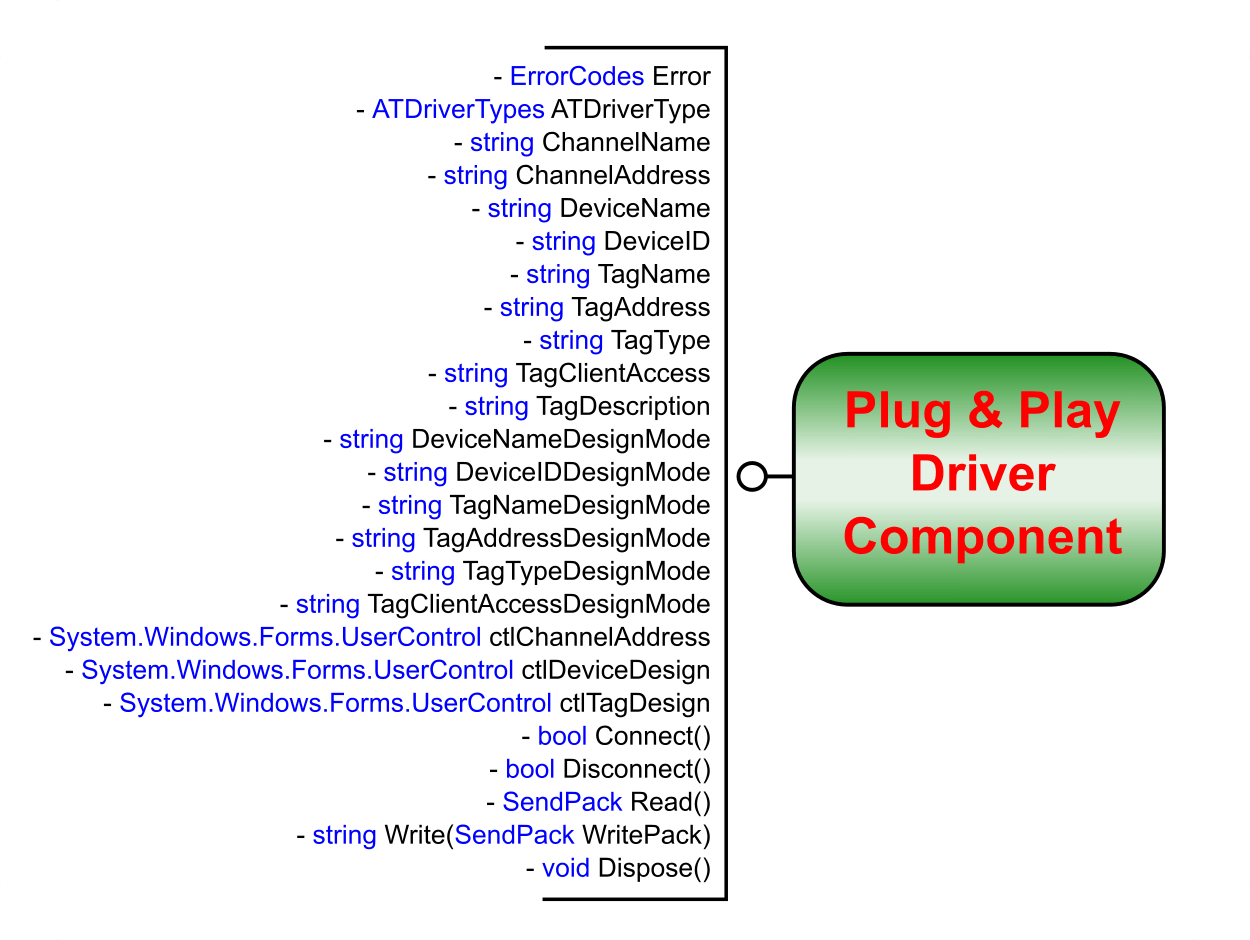
Figure 1: The necessary interfaces for a driver to be plug-and-play in ATDriver Server.
Available Source Code for SCADA Driver Development
ATDriver provides sample source code to help developers get started and reduce development time.
Included examples:
- Modbus RTU Driver Source Code
- Modbus TCP/IP Driver Source Code
These examples demonstrate:
- Communication handling
- Data reading/writing methods
- Protocol structure implementation
Programming Requirements for Native SCADA Driver
To successfully develop a SCADA driver in ATDriver, you need the following technical skills:
Programming Languages
- C# (.NET)
- VB.NET
Development Environment
- Microsoft Visual Studio
Technical Knowledge
- Creating Component (DLL) in Visual Studio
- Understanding class libraries and driver structure
- Building and compiling projects into DLL files
These DLL files will be loaded into ATDriver Server as Plug & Play drivers.
SCADA Driver Development Workflow in ATDriver
Analyze Communication Protocol
- Identify device protocol (Modbus, TCP/IP, Serial, etc.)
- Understand register mapping and data structure
Develop Driver Component (DLL)
- Create a Class Library project in Visual Studio
- Implement communication logic (Read/Write functions)
Build and Export DLL
- Compile the project into a DLL file
- Ensure compatibility with ATDriver Server
Integrate into ATDriver Server
- Load DLL into the driver system
- Configure communication parameters
Test and Optimize
- Validate real-time communication
- Debug errors and optimize performance
Advantages of Native SCADA Driver Development
Developing a native SCADA driver in ATDriver offers significant benefits:
High Performance
Direct communication without OPC layers reduces latency.
Full Customization
Supports proprietary protocols and special device requirements.
Easy Integration
Seamlessly works with ATSCADA Tag system and real-time data engine.
Scalability
Supports large-scale industrial systems and distributed architectures.
Best Practices for SCADA Driver Development
To ensure reliability and efficiency:
- Use structured and modular code
- Implement error handling and reconnection logic
- Optimize polling cycle timing
- Test with both simulation and real devices
- Reuse logic from Modbus sample drivers when possible
Real-World Applications
SCADA drivers developed with ATDriver are widely used in:
- Industrial automation systems
- Energy monitoring systems
- Smart factories (Industry 4.0)
- Water treatment and infrastructure
- IoT-based monitoring platforms and modern SCADA cloud system deployments
Conclusion
SCADA driver development in ATDriver provides a powerful and flexible way to build communication layers for industrial systems. With Plug & Play architecture, sample Modbus source code, and support for .NET development, engineers can quickly create high-performance native drivers tailored to any application.

ATSCADA - Smart SCADA Software with AI Predictor & Blockchain. ATSCADA is an advanced SCADA software platform for real-time monitoring, intelligent control, and efficient data acquisition. It is ideal for Industrial IoT (IIoT), smart cities, integrated automation systems, and Agriculture 4.0. With a built-in AI Predictor, ATSCADA enables predictive analytics to detect issues early, optimize performance, and reduce downtime. The integration of Blockchain technology ensures secure, transparent, and tamper-proof data management. Highly scalable and easy to integrate, ATSCADA is trusted by businesses to enhance productivity, strengthen cybersecurity, and accelerate digital transformation.
Related articles
ATSCADA iStreamCameraTools – Industrial IP Camera Integration and Real-Time Video Monitoring
The iStreamCameraTools toolkit enables the connection of ONVIF-compatible cameras to receive camera streams and display [...]
Jun
OPC Server Connection Guide
Overview The ATSCADA ecosystem provides exceptional flexibility for integrating data from third-party OPC Servers (such [...]
Jun
Common ATSCADA Errors and How to Fix Them – FAQ for ATSCADA Tools and Systems
Issues Related to ATDriverServer & iTagBuilder Software Why Does ATDriverServer Not Open? There are two [...]
May
ATSCADA Hospital Temperature and Humidity Monitoring Alarm System Project
Requirements: The system includes three monitoring areas: the pharmacy, inpatient warehouse, and cold storage, following [...]
May
ATSCADA CookBook: Complete Guide to System Architecture, Tools, Installation & Troubleshooting
The ATSCADA Training book is an essential navigation structure that helps users access all major [...]
Apr
ATSCADA Power Management System
Requirements: There are 3 areas that require power management, including a factory, a residential zone, [...]
Apr