
SCADA Software
Cloud SCADA Software: ATSCADA Cloud Server Architecture Explained
Cloud SCADA software is transforming how industrial systems are monitored, controlled, and optimized. Instead of relying on traditional on-premise infrastructure, modern SCADA platforms leverage cloud computing to provide real-time data access, scalability, and remote control capabilities.
Industries such as manufacturing, energy, water treatment, and smart infrastructure are increasingly adopting cloud-based SCADA systems to improve efficiency and reduce operational costs. Solutions like ATSCADA Cloud Server represent this shift by combining industrial automation with modern cloud technologies.
This article explores how cloud SCADA software works, its architecture, benefits, and how ATSCADA enables scalable industrial monitoring systems. Businesses looking for advanced SCADA software solutions can explore a wide range of platforms designed for industrial automation and real-time monitoring.
What is Cloud SCADA Software?
Cloud SCADA software is a modern evolution of traditional SCADA systems. It enables industrial data to be collected from field devices and processed in cloud infrastructure instead of local servers.
Unlike conventional SCADA systems, cloud-based solutions provide:
- Remote access from any location
- Centralized data management
- Real-time monitoring and control
- Scalable infrastructure
This allows organizations to manage distributed assets more efficiently while reducing the need for on-site hardware.
How Cloud SCADA Software Works
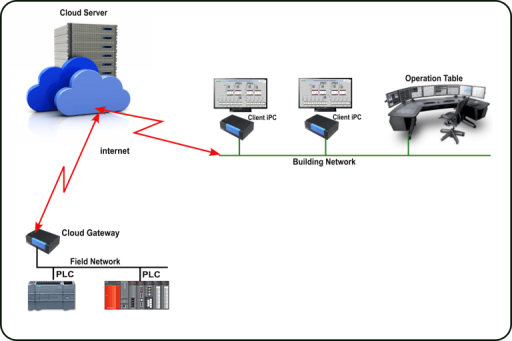
Cloud SCADA systems operate through a structured data flow that connects field devices to cloud-based platforms.
Data Collection from Field Devices
Sensors, PLCs, and RTUs collect real-time data such as temperature, pressure, and flow. These devices form the foundation of any SCADA system.
Secure Data Transmission
Data is transmitted using industrial protocols such as Modbus, OPC UA, or DNP3 through Ethernet, cellular, or fiber networks.
Cloud Data Processing
The cloud server processes incoming data, stores it, and manages alarms and system events.
Visualization and Control
Operators access dashboards through web-based HMI interfaces, enabling real-time monitoring and remote control within a modern SCADA cloud system.
Continuous Feedback Loop
Control commands are sent back to field devices, ensuring a closed-loop automation system.
ATSCADA Cloud Server Architecture Overview
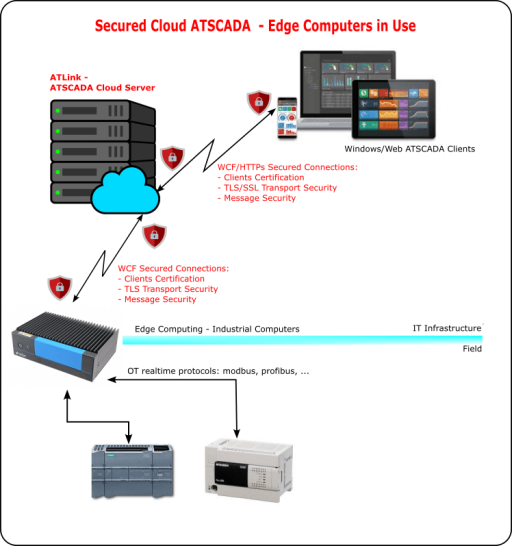
Edge Layer
Includes sensors, PLCs, and RTUs that collect real-time data from industrial processes.
Communication Layer
Ensures secure and reliable data transmission between field devices and the cloud, supported by regular SCADA driver updates to maintain compatibility and performance.
Cloud Server Layer
Acts as the central processing system, handling data aggregation, storage, and analysis.
Application Layer
Provides dashboards and HMI interfaces for users to monitor and control operations.
Analytics Layer
Supports data analysis, predictive maintenance, and performance optimization.
Key Features of Cloud SCADA Software
Real-Time Monitoring
Allows operators to monitor system performance instantly.
Remote Accessibility
Provides access from anywhere via web or mobile devices.
Scalability
Cloud infrastructure enables easy system expansion.
Data Storage and Analytics
Stores historical data and enables advanced analysis.
IoT Integration
Supports integration with IoT devices and enterprise systems.
Benefits of Cloud SCADA Software
Reduced Infrastructure Costs
Eliminates the need for local servers and maintenance.
Improved Operational Efficiency
Real-time data helps reduce downtime and optimize processes.
High Flexibility
Systems can be customized and scaled easily.
Better Decision-Making
Data insights support strategic planning.
Centralized Monitoring
Monitor multiple locations from one platform.
Real-World Applications of Cloud SCADA Software
Manufacturing
Monitor production lines and optimize machine performance.
Energy Systems
Manage power distribution and detect faults.
Water Treatment
Monitor flow rates and water quality.
Smart Cities
Control infrastructure such as traffic and utilities.
Best Practices for Implementing Cloud SCADA Software
Ensure Cybersecurity
Use encryption, firewalls, and access control.
Optimize Network Performance
Maintain low latency and stable connections.
Design for Scalability
Build modular systems that grow with your needs.
Implement Redundancy
Ensure continuous operation with backup systems.
Integrate with Existing Systems
Maintain compatibility with legacy and enterprise systems.
Why Choose ATSCADA Cloud SCADA Software?
ATSCADA provides a modern cloud SCADA architecture designed for industrial environments.
- Flexible deployment options
- Real-time monitoring and analytics
- Web-based access
- Scalable system architecture
Its modular design enables businesses to build efficient and future-ready automation systems.
Conclusion
Cloud SCADA software is redefining industrial automation by enabling real-time monitoring, remote control, and scalable infrastructure. Solutions like ATSCADA Cloud Server help organizations transition to modern, data-driven operations.
By adopting cloud SCADA technology, businesses can improve efficiency, reduce costs, and gain a competitive advantage in today’s industrial landscape.

ATSCADA - Smart SCADA Software with AI Predictor & Blockchain. ATSCADA is an advanced SCADA software platform for real-time monitoring, intelligent control, and efficient data acquisition. It is ideal for Industrial IoT (IIoT), smart cities, integrated automation systems, and Agriculture 4.0. With a built-in AI Predictor, ATSCADA enables predictive analytics to detect issues early, optimize performance, and reduce downtime. The integration of Blockchain technology ensures secure, transparent, and tamper-proof data management. Highly scalable and easy to integrate, ATSCADA is trusted by businesses to enhance productivity, strengthen cybersecurity, and accelerate digital transformation.
Related articles
ATSCADA iStreamCameraTools – Industrial IP Camera Integration and Real-Time Video Monitoring
The iStreamCameraTools toolkit enables the connection of ONVIF-compatible cameras to receive camera streams and display [...]
Jun
OPC Server Connection Guide
Overview The ATSCADA ecosystem provides exceptional flexibility for integrating data from third-party OPC Servers (such [...]
Jun
Common ATSCADA Errors and How to Fix Them – FAQ for ATSCADA Tools and Systems
Issues Related to ATDriverServer & iTagBuilder Software Why Does ATDriverServer Not Open? There are two [...]
May
ATSCADA Hospital Temperature and Humidity Monitoring Alarm System Project
Requirements: The system includes three monitoring areas: the pharmacy, inpatient warehouse, and cold storage, following [...]
May
ATSCADA CookBook: Complete Guide to System Architecture, Tools, Installation & Troubleshooting
The ATSCADA Training book is an essential navigation structure that helps users access all major [...]
Apr
ATSCADA Power Management System
Requirements: There are 3 areas that require power management, including a factory, a residential zone, [...]
Apr