
SCADA Software
ATSCADA iDriver: The Core Engine for Real-Time SCADA Data Collection
In the ATSCADA ecosystem, ATSCADA iDriver is more than a standard communication driver. It acts as the central engine that manages real-time data exchange across the entire SCADA platform. By connecting field devices, OPC servers, and monitoring applications, iDriver ensures stable, synchronized, and efficient industrial data flow.
What Is iDriver? (Core Function and Purpose)
ATSCADA iDriver is a core component within the ATSCADA architecture. It connects supervisory applications with lower-level data sources such as ATDriver Server and OPC Server systems.
Its main responsibilities include:
- Reading and managing Tag Files created in iTagBuilder
- Establishing communication with industrial devices
- Collecting and updating real-time values
- Delivering live data to dashboards and SCADA interfaces
This makes ATSCADA iDriver the heart of the system’s communication layer.
Role in SCADA Architecture: Decoupling Layer and Data Engine
Instead of allowing interface objects like iTextBox, iGauge, or iButton to communicate directly with PLC protocols, ATSCADA uses ATSCADA iDriver as an intermediate layer.
Real-Time Data Engine
ATSCADA iDriver continuously gathers information from multiple sources, standardizes the values, and distributes them instantly to connected applications. This centralized model keeps all UI components synchronized with minimal latency.
System Decoupling Layer
The user interface works only with Tags, while communication tasks remain inside iDriver. This architecture allows protocol changes or device upgrades without redesigning the HMI interface.
Tag-Centric Data Model
A major strength of iDriver is its ability to abstract raw data from different protocols into unified Tags.
- Programming Efficiency: Engineers only need to bind UI tools to tags without worrying whether the data comes from Modbus or OPC.
- Reusability: Tags can be shared across multiple screens, reports, and control logic blocks.
- Structured Management: iDriver organizes the system efficiently through TaskCollection (process management) and TagCollection (data point management) in the ATSCADA installation guide.
Multi-Instance and Inheritance Mechanism
To support large-scale projects, iDriver provides flexible multi-instance and inheritance features in the ATSCADA installation guide.
- Multiple iDriver instances can exist across different forms or modules.
- Inheritance: These instances can inherit configurations from an initial Base iDriver. This helps engineers reuse settings, reduce setup time, and maintain data consistency across distributed systems.
iDriver Data Acquisition Workflow
The professional data collection flow of iDriver can be described in four steps:
- Tag Configuration:
Tags are defined in iTagBuilder and saved as Tag Files. - Data Connection:
iDriver calls connection plugins to communicate with ATDriver Server or OPC Server. - Real-Time Processing:
iDriver continuously updates tag values and synchronizes status across all system components. - Data Distribution:
Standardized data is delivered to control interfaces, alarm systems, dashboards, and reports.
Performance and Optimization for Large Systems
iDriver is designed to process high-frequency industrial data without reducing system performance.
- Event-Driven Updates:
The interface updates only when data changes, minimizing CPU usage and network bandwidth consumption. - Data Caching:
Buffering mechanisms reduce unnecessary reconnection requests. - Redundancy Support ensures high availability and can be enhanced with a cloud ATSCADA security system for mission-critical industrial environments.
Ensures high availability and stability for mission-critical industrial systems.

Industry 4.0 Readiness
- OPC Integration:
iDriver supports standard OPC communication, allowing seamless integration with third-party software and hardware in the ATSCADA installation guide. - Cloud and IIoT :iDriver serves as a key gateway for connecting Industrial IoT (IIoT) devices, providing centralized data for advanced predictive analytics systems and supporting cloud-based monitoring and management in the ATSCADA installation guide.
Install iDriver into Windows Forms Applications for Other ATSCADA Components
System Preparation and Installation
Step 1: Create a New Windows Forms App (.NET Framework) Project
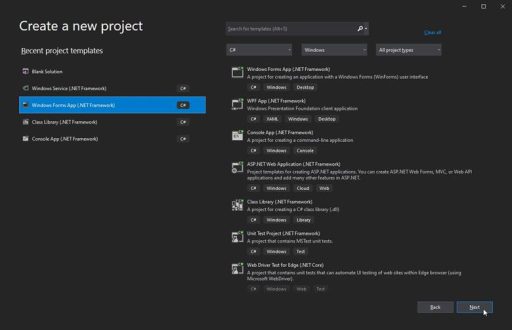
Name your project and select the framework as .NET Framework 4.5.
Step 2: Add the iDriver Library to the Toolbox
In the Visual Studio interface, select View > Toolbox in the ATSCADA installation guide.
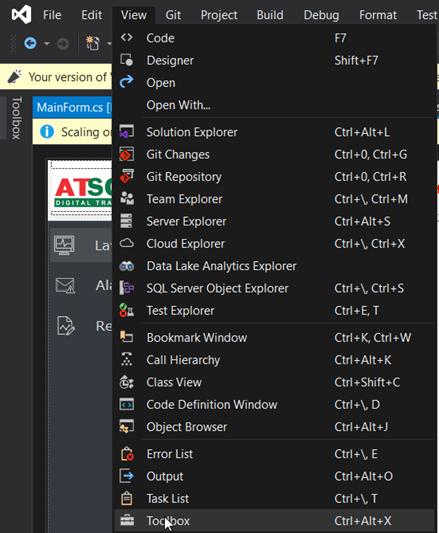
In the ToolBox interface, right-click and select Add Tab.
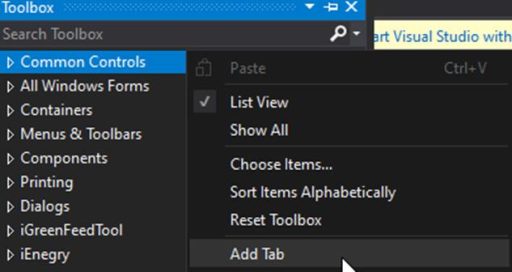
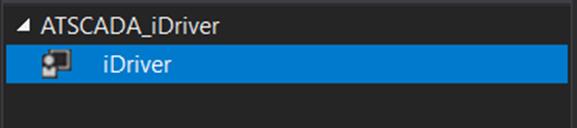
Enter the name ATSCADA_iDriver for easy identification.
Then right-click the newly created ATSCADA_iDriver tab and select Choose Items in the ATSCADA installation guide.
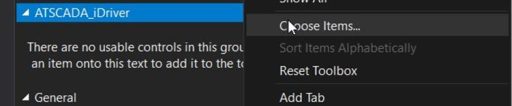
Select Browser to proceed to choose the correct library:
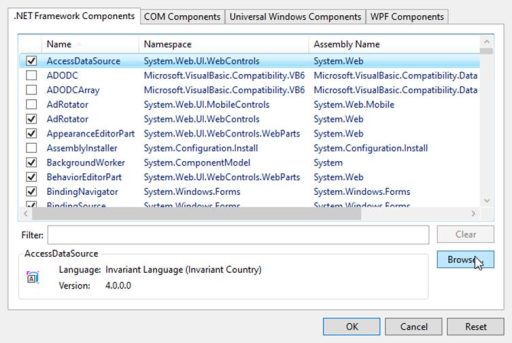
Select the iDriver.dll library from the following path:
C:\Program Files\ATPro\ATSCADA\
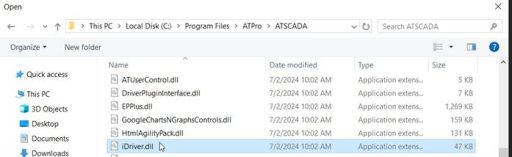
After successfully selecting, click OK to add the iDriver library in the ATSCADA installation guide.
Once added successfully, the ATSCADA_iDriver tab will display a list of components used for data operations.
👉 Learn More about SCADA Software

ATSCADA - Smart SCADA Software with AI Predictor & Blockchain. ATSCADA is an advanced SCADA software platform for real-time monitoring, intelligent control, and efficient data acquisition. It is ideal for Industrial IoT (IIoT), smart cities, integrated automation systems, and Agriculture 4.0. With a built-in AI Predictor, ATSCADA enables predictive analytics to detect issues early, optimize performance, and reduce downtime. The integration of Blockchain technology ensures secure, transparent, and tamper-proof data management. Highly scalable and easy to integrate, ATSCADA is trusted by businesses to enhance productivity, strengthen cybersecurity, and accelerate digital transformation.
Related articles
ATSCADA iStreamCameraTools – Industrial IP Camera Integration and Real-Time Video Monitoring
The iStreamCameraTools toolkit enables the connection of ONVIF-compatible cameras to receive camera streams and display [...]
Jun
OPC Server Connection Guide
Overview The ATSCADA ecosystem provides exceptional flexibility for integrating data from third-party OPC Servers (such [...]
Jun
Common ATSCADA Errors and How to Fix Them – FAQ for ATSCADA Tools and Systems
Issues Related to ATDriverServer & iTagBuilder Software Why Does ATDriverServer Not Open? There are two [...]
May
ATSCADA Hospital Temperature and Humidity Monitoring Alarm System Project
Requirements: The system includes three monitoring areas: the pharmacy, inpatient warehouse, and cold storage, following [...]
May
ATSCADA CookBook: Complete Guide to System Architecture, Tools, Installation & Troubleshooting
The ATSCADA Training book is an essential navigation structure that helps users access all major [...]
Apr
ATSCADA Power Management System
Requirements: There are 3 areas that require power management, including a factory, a residential zone, [...]
Apr